OpenCode-Konfigurationsdatei
OpenCode verwendet das JSON-Format für die Konfiguration.
Wir können uns zunächst die globale Konfigurationsdatei ansehen~/.config/opencode/opencode.json:
touch ~/.config/opencode/opencode.json
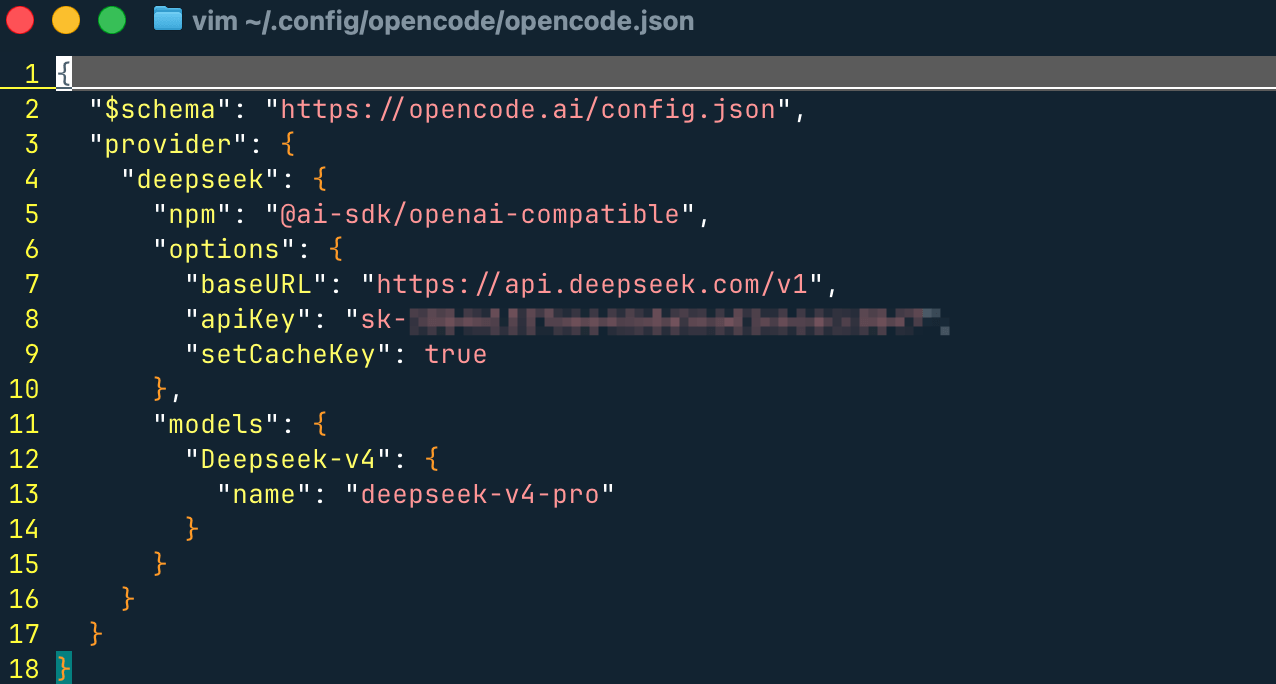
Enthält Modellanbieter- und Konfigurationsinformationen:
{
  // JSON Schema(用于编辑器校验和自动补全)
  "$schema": "https://opencode.ai/config.json",

  "provider": {
    // 自定义 Provider 名称(使用时:deepseek/xxx)
    "deepseek": {

      // 使用 OpenAI 兼容适配器(适用于 DeepSeek 这类兼容接口)
      "npm": "@ai-sdk/openai-compatible",

      "options": {
        // API 基础地址(必须是 OpenAI 兼容格式)
        "baseURL": "https://api.deepseek.com/v1",

        // API Key
        "apiKey": "sk-xxxx",

        // 是否强制设置缓存 key(提升缓存命中率,降低成本)
        "setCacheKey": true
      },

      "models": {
        // 本地模型别名(CLI/TUI 中使用:deepseek/Deepseek-v4)
        "Deepseek-v4": {
          // 实际调用的模型名称(API 层)
          "name": "deepseek-v4-pro"
        }
      }
    }
  }
}
Ein minimal funktionsfähiges Konfigurationsbeispiel
{
  "$schema": "https://opencode.ai/config.json",
  "model": "anthropic/claude-sonnet-4-5",
  "autoupdate": true,
  "theme": "default"
}
Gängige globale Konfigurationseinträge:
| Konfigurationselement | Type | Beschreibung |
|---|---|---|
model |
string | Standard-Hauptmodell |
small_model |
string | Leichtgewichtiges Aufgabenmodell (z. B. Titelerzeugung) |
autoupdate |
boolean / "notify" | Auto-Update-Richtlinie |
theme |
string | UI-Theme |
provider |
Objekt | Modellanbieter-Konfiguration |
Provider-Beispiel:
{
  "provider": {
    "anthropic": {
      "options": {
        "timeout": 600000,
        "setCacheKey": true
      }
    }
  }
}
Die Konfiguration „Merge-Mechanismus“ verstehen
Die OpenCode-Konfiguration wird nicht überschrieben, sondernschichtweise zusammengeführt。
Ladereihenfolge (von niedrig nach hoch)
| Reihenfolge | Source | Beschreibung |
|---|---|---|
| 1 | Remote.well-known/opencode |
Standardkonfiguration der Organisation |
| 2 | Globale Konfiguration | ~/.config/opencode/opencode.json |
| 3 | Benutzerdefinierter Pfad | OPENCODE_CONFIG |
| 4 | Projektkonfiguration | Im Projektopencode.json |
| 5 | .opencode/Verzeichnis |
Erweiterungsfähigkeit |
| 6 | Inline-Konfiguration | OPENCODE_CONFIG_CONTENT |
Zusammenführungsregeln
- Nicht in Konflikt stehende Felder: alle bleiben erhalten
- In Konflikt stehende Felder: Letzteres überschreibt Ersteres
Beispiel
Globale Konfiguration:
{
  "autoupdate": true
}
Projektkonfiguration:
{
  "model": "anthropic/claude-sonnet-4-5"
}
Endergebnis:
{
  "autoupdate": true,
  "model": "anthropic/claude-sonnet-4-5"
}
Projektkonfiguration
Im Projektstammverzeichnis erstellen:
opencode.json
Zweck:
- Projektspezifisches KI-Verhalten definieren
- Kann in Git committet werden
- Globale Konfiguration überschreiben
Beispiel: Konfiguration auf Projektebene
{
  "$schema": "https://opencode.ai/config.json",
  "model": "anthropic/claude-sonnet-4-5",
  "tools": {
    "write": true,
    "bash": true
  }
}
Detaillierte Erklärung der Kernkonfigurationsmodule
{
  "model": "anthropic/claude-sonnet-4-5",
  "small_model": "anthropic/claude-haiku-4-5"
}
Modelle und Anbieter
{
  "model": "anthropic/claude-sonnet-4-5",
  "small_model": "anthropic/claude-haiku-4-5"
}
| Feld | Beschreibung |
|---|---|
model |
Hauptaufgabenmodell |
small_model |
Kostengünstiges Aufgabenmodell |
Tool-Steuerung
{
  "tools": {
    "write": false,
    "bash": false
  }
}
| Tool | Zweck |
|---|---|
| write | Datei schreiben |
| bash | Befehl ausführen |
Dies istDie erste Ebene der Sicherheitskontrolle。
Berechtigungskontrolle
{
  "permission": {
    "edit": "ask",
    "bash": "ask"
  }
}
| Wert | Bedeutung |
|---|---|
| erlauben | Automatisch ausführen |
| ask | Jedes Mal bestätigen |
| verweigern | Verboten |
Agent (Kernfähigkeit)
{
  "agent": {
    "code-reviewer": {
      "description": "代码审查",
      "model": "anthropic/claude-sonnet-4-5",
      "prompt": "You are a code reviewer",
      "tools": {
        "write": false
      }
    }
  }
}
Essenz:Rolle + Fähigkeitsumfang für KI definieren
Befehl (Automatisierter Prompt)
{
  "command": {
    "test": {
      "template": "Run tests and fix failures",
      "description": "运行测试"
    }
  }
}
Essenz:Prompt-Vorlagensystem
TUI-Konfiguration
{
  "tui": {
    "scroll_speed": 3,
    "scroll_acceleration": {
      "enabled": true
    },
    "diff_style": "auto"
  }
}
Serverkonfiguration (API / Web)
{
  "server": {
    "port": 4096,
    "hostname": "0.0.0.0",
    "mdns": true
  }
}
Kontextkomprimierung (Token-Optimierung)
{
  "compaction": {
    "auto": true,
    "prune": true,
    "reserved": 10000
  }
}
Plugin-System
{
  "plugin": [
    "opencode-helicone-session",
    "@my-org/custom-plugin"
  ]
}
MCP (Erweiterungs-Ökosystem)
{
  "mcp": {}
}
Dient zur Integration externer Tools (wie Jira, Datenbanken usw.)
Instruktionssystem (KI-Regeln)
{
  "instructions": [
    "CONTRIBUTING.md",
    "docs/*.md"
  ]
}
Provider-Steuerung
{
  "enabled_providers": ["anthropic"],
  "disabled_providers": ["openai"]
}
Priorität:
disabled > enabled
Variablensystem
Umgebungsvariablen:
{
  "model": "{env:OPENCODE_MODEL}"
}
Dateireferenz
{
  "apiKey": "{file:~/.secrets/key}"
}
Verzeichnis-Erweiterungsmechanismus
OpenCode ist nicht nur eine JSON-Konfiguration, sondern unterstützt auch Verzeichniserweiterungen:
.opencode/
├── agents/
├── commands/
├── plugins/
├── tools/
├── themes/
Zweck:
- Agenten mit Markdown definieren
- Befehle auf Dateiebene
- Plugin-Erweiterungen
Empfohlene Einstiegskonfiguration
{
  "$schema": "https://opencode.ai/config.json",
  "model": "anthropic/claude-sonnet-4-5",
  "small_model": "anthropic/claude-haiku-4-5",
  "autoupdate": "notify",
  "tools": {
    "write": true,
    "bash": true
  },
  "permission": {
    "bash": "ask"
  },
  "compaction": {
    "auto": true,
    "prune": true
  }
}
Zusammenfassung (Architekturperspektive)
Die OpenCode-Konfiguration kann als vierschichtige Struktur verstanden werden:
配置层(多级 merge)
    ↓
能力层(agent / tools / mcp)
    ↓
执行层(model / provider)
    ↓
交互层(tui / server / web)
Im Wesentlichen ist es keine einfache Konfigurationsdatei, sondern ein:
Konfigurationszentrum eines programmierbaren KI-Agenten-Betriebssystems
Andere Erweiterungen