jQuery EasyUI ウィンドウ -シンプルなウィンドウを作成
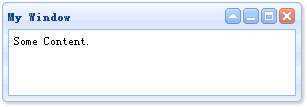
ウィンドウ(window)の作成はとても簡単です。DIV マークを作成します:
<div id="win" class="easyui-window" title="My Window" style="width:300px;height:100px;padding:5px;">
    Some Content.
</div>
テストページを実行すると、画面にウィンドウ(window)が表示されます。javascript コードを記述する必要はありません。
非表示のウィンドウ(window)を作成したい場合は、'closed' 属性を 'true' に設定し、'open' メソッドを呼び出してウィンドウ(window)を開くことができます:
<div id="win" class="easyui-window" title="My Window" closed="true" style="width:300px;height:100px;padding:5px;">
    Some Content.
</div>
$('#win').window('open');
最後のサンプルとして、ログインウィンドウ(window)を作成します:
<div id="win" class="easyui-window" title="Login" style="width:300px;height:180px;">
    <form style="padding:10px 20px 10px 40px;">
        <p>Name: <input type="text"></p>
        <p>Pass: <input type="password"></p>
        <div style="padding:5px;text-align:center;">
            <a href="../index.html" class="easyui-linkbutton" icon="icon-ok">Ok</a>
            <a href="../index.html" class="easyui-linkbutton" icon="icon-cancel">Cancel</a>
        </div>
    </form>
</div>

jQuery EasyUI サンプルをダウンロード
jeasyui-win-win1.zip
その他の拡張