jQuery EasyUI レイアウト -XP スタイルの左側パネルを作成
通常、Windows XP のエクスプローラーフォルダーでは、左側のパネル(panel)にいくつかの一般的なタスクが含まれています。本チュートリアルでは、easyui のパネル(panel)プラグインを使用して XP の左側パネルを作成する方法を説明します。
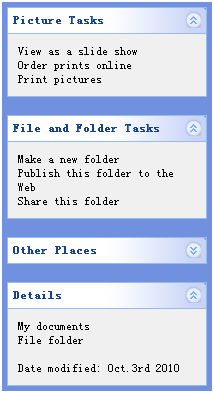
いくつかのパネル(panel)を定義する
タスクを表示するためのいくつかのパネル(panel)を定義します。各パネル(panel)には、少なくとも折りたたみ/展開ツールボタンが必要です。
コードは次のとおりです:
    <div style="width:200px;height:auto;background:#7190E0;padding:5px;">
        <div class="easyui-panel" title="Picture Tasks" collapsible="true" style="width:200px;height:auto;padding:10px;">
            View as a slide show<br/>
            Order prints online<br/>
            Print pictures
        </div>
        <br/>
        <div class="easyui-panel" title="File and Folder Tasks" collapsible="true" style="width:200px;height:auto;padding:10px;">
            Make a new folder<br/>
            Publish this folder to the Web<br/>
            Share this folder
        </div>
        <br/>
        <div class="easyui-panel" title="Other Places" collapsible="true" collapsed="true" style="width:200px;height:auto;padding:10px;">
            New York<br/>
            My Pictures<br/>
            My Computer<br/>
            My Network Places
        </div>
        <br/>
        <div class="easyui-panel" title="Details" collapsible="true" style="width:200px;height:auto;padding:10px;">
            My documents<br/>
            File folder<br/><br/>
            Date modified: Oct.3rd 2010
        </div>
    </div>
パネル(panel)の外観をカスタマイズする
このビューの外観は望ましいものではないことに注意してください。パネル(panel)のヘッダー背景画像と折りたたみ/展開ボタンのアイコンを変更する必要があります。
これを実現するのは難しくありません。いくつかの CSS を再定義するだけです。
    .panel-body{
        background:#F0F0F0;
    }
    .panel-header{
        background:#fff url('images/panel_header_bg.gif') no-repeat top right;
    }
    .panel-tool-collapse{
        background:url('images/arrow_up.gif') no-repeat 0px -3px;
    }
    .panel-tool-expand{
        background:url('images/arrow_down.gif') no-repeat 0px -3px;
    }
このように、easyui を使用してユーザーインターフェースを定義するのは非常に簡単です。
jQuery EasyUI サンプルをダウンロード
jeasyui-layout-xp.zip
その他の拡張