jQuery EasyUI ドラッグ&ドロップ -ドラッグ&ドロップのショッピングカートを作成
あなたのWebアプリケーションでドラッグ&ドロップを簡単に実装できるなら、特別な何かを実感できるでしょう。jQuery EasyUI を使えば、Web アプリケーションでドラッグ&ドロップ機能を簡単に実装できます。
このチュートリアルでは、ユーザーが購入したい商品をドラッグ&ドロップできるショッピングカートページを作成する方法を紹介します。買い物かご内の商品と価格が更新されます。
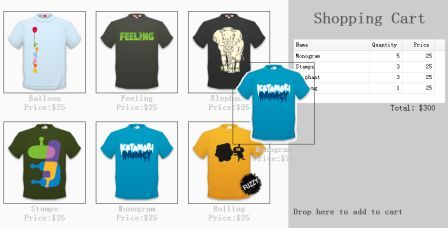
ページ上の商品を表示する
    <ul class="products">
        <li>
            <a href="../index.html" class="item">
                <img src="images/shirt1.gif.html"/>
                <div>
                    <p>Balloon</p>
                    <p>Price:$25</p>
                </div>
            </a>
        </li>
        <li>
            <a href="../index.html" class="item">
                <img src="images/shirt2.gif.html"/>
                <div>
                    <p>Feeling</p>
                    <p>Price:$25</p>
                </div>
            </a>
        </li>
        <!-- other products -->
    </ul>
上記のコードでわかるように、商品を表示するためにいくつかの <li> 要素を含む <ul> 要素を追加しました。すべての商品には名前と価格のプロパティがあり、それらは <p> 要素内に含まれています。
ショッピングカートの作成
    <div class="cart">
        <h1>Shopping Cart</h1>
        <table id="cartcontent" style="width:300px;height:auto;">
            <thead>
                <tr>
                    <th field="name" width=140>Name</th>
                    <th field="quantity" width=60 align="right">Quantity</th>
                    <th field="price" width=60 align="right">Price</th>
                </tr>
            </thead>
        </table>
        <p class="total">Total: $0</p>
        <h2>Drop here to add to cart</h2>
    </div>
データグリッド(datagrid)を使用して、買い物かご内の商品を表示します。
クローンされた商品をドラッグする
    $('.item').draggable({
        revert:true,
        proxy:'clone',
        onStartDrag:function(){
            $(this).draggable('options').cursor = 'not-allowed';
            $(this).draggable('proxy').css('z-index',10);
        },
        onStopDrag:function(){
            $(this).draggable('options').cursor='move';
        }
    });
draggable 属性の値を 'proxy' から 'clone' に設定していることに注意してください。ドラッグされる要素はクローンによって生成されます。
選択した商品をショッピングカートにドロップする
    $('.cart').droppable({
        onDragEnter:function(e,source){
            $(source).draggable('options').cursor='auto';
        },
        onDragLeave:function(e,source){
            $(source).draggable('options').cursor='not-allowed';
        },
        onDrop:function(e,source){
            var name = $(source).find('p:eq(0)').html();
            var price = $(source).find('p:eq(1)').html();
            addProduct(name, parseFloat(price.split('$')[1]));
        }
    });
    var data = {"total":0,"rows":[]};
    var totalCost = 0;
    function addProduct(name,price){
        function add(){
            for(var i=0; i<data.total; i++){
                var row = data.rows[i];
                if (row.name == name){
                    row.quantity += 1;
                    return;
                }
            }
            data.total += 1;
            data.rows.push({
                name:name,
                quantity:1,
                price:price
            });
        }
        add();
        totalCost += price;
        $('#cartcontent').datagrid('loadData', data);
        $('div.cart .total').html('Total: $'+totalCost);
    }
商品をドロップするたびに、最初に商品名と価格を取得し、次に 'addProduct' 関数を呼び出して買い物かごを更新します。
jQuery EasyUI サンプルのダウンロード
jeasyui-dd-shopping.zip
その他の拡張機能