jQuery EasyUI フォーム -ツリードロップダウンボックスの作成
ツリードロップダウン(ComboTree)は、ドロップダウン形式のツリー構造(Tree)を持つコンボボックス(ComboBox)です。フォームフィールドとして使用でき、リモートサーバーに送信できます。
このチュートリアルでは、name、address、city フィールドを備えた登録フォームを作成します。city フィールドはツリードロップダウン(ComboTree)フィールドで、ユーザーはその中でツリーパネルをプルダウンし、特定の都市を選択できます。
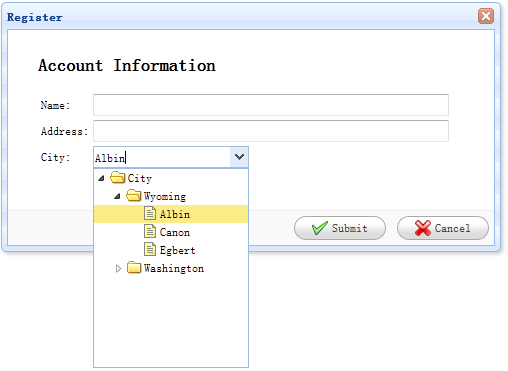
フォームの作成
    <div id="dlg" class="easyui-dialog" style="width:500px;height:250px;padding:10px 30px;"
            title="Register" buttons="#dlg-buttons">
        <h2>Account Information</h2>
        <form id="ff" method="post">
            <table>
                <tr>
                    <td>Name:</td>
                    <td><input type="text" name="name" style="width:350px;"/></td>
                </tr>
                <tr>
                    <td>Address:</td>
                    <td><input type="text" name="address" style="width:350px;"/></td>
                </tr>
                <tr>
                    <td>City:</td>
                    <td><select class="easyui-combotree" url="data/city_data.json" name="city" style="width:156px;"/></td>
                </tr>
            </table>
        </form>
    </div>
    <div id="dlg-buttons">
        <a href="../index.html" class="easyui-linkbutton" iconCls="icon-ok" onclick="savereg()">Submit</a>
        <a href="../index.html" class="easyui-linkbutton" iconCls="icon-cancel" onclick="javascript:$('#dlg').dialog('close')">Cancel</a>
    </div>
上記のコードからわかるように、'city' という名前のツリードロップダウン(ComboTree)フィールドに url 属性を設定しました。このフィールドはリモートサーバーからツリー構造(Tree)データを取得できます。このフィールドには 'easyui-combotree' というクラス名があるため、JSコードを一切書く必要はなく、ツリードロップダウン(ComboTree)フィールドは自動的にレンダリングされます。
jQuery EasyUI サンプルをダウンロード
jeasyui-form-form2.zip
その他の拡張