jQuery EasyUI データグリッド -列グループの作成
easyui のデータグリッド(DataGrid)は列グループを作成できます。次に示すとおりです:
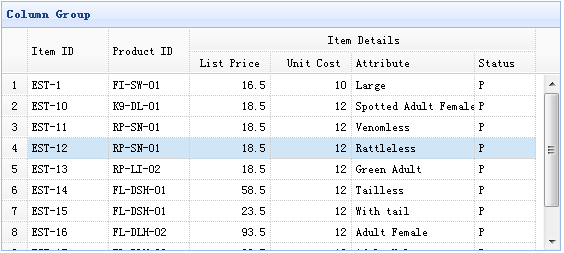
このインスタンスでは、フラットデータを使用してデータグリッド(DataGrid)のデータを埋め、listprice、unitcost、addr1、status 列を単一の列の下にグループ化します。
列グループを作成するには、データグリッド(datagrid)プラグインの columns データを定義する必要があります。列の各要素は、rowspan または colspan 属性を使用してグループ化できる一連のセルを定義します。
以下のコードは上記のインスタンスを実装しています:
    <table id="tt" title="Column Group" class="easyui-datagrid" style="width:550px;height:250px"
            url="data/datagrid_data.json"
            singleSelect="true" iconCls="icon-save" rownumbers="true">
        <thead>
            <tr>
                <th rowspan="2" field="itemid" width="80">Item ID</th>
                <th rowspan="2" field="productid" width="80">Product ID</th>
                <th colspan="4">Item Details</th>
            </tr>
            <tr>
                <th field="listprice" width="80" align="right">List Price</th>
                <th field="unitcost" width="80" align="right">Unit Cost</th>
                <th field="attr1" width="100">Attribute</th>
                <th field="status" width="60" align="center">Stauts</th>
            </tr>
        </thead>
    </table>
jQuery EasyUI インスタンスをダウンロード
jeasyui-datagrid-datagrid9.zip
その他の拡張