jQuery EasyUI データグリッド -凍結列の設定
このサンプルでは、いくつかの列を凍結する方法を説明します。ユーザーがグリッド上で水平スクロールバーを移動しても、凍結した列はビューの外にスクロールされません。
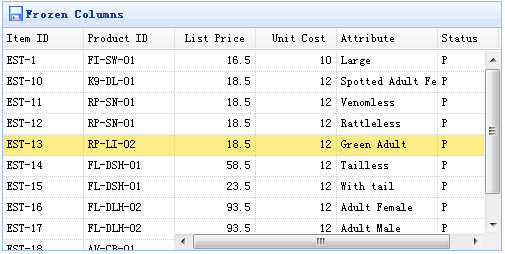
列を凍結するには、frozenColumns プロパティを定義する必要があります。frozenColumn プロパティは columns プロパティと同じです。
    $('#tt').datagrid({
        title:'Frozen Columns',
        iconCls:'icon-save',
        width:500,
        height:250,
        url:'data/datagrid_data.json',
        frozenColumns:[[
            {field:'itemid',title:'Item ID',width:80},
            {field:'productid',title:'Product ID',width:80},
        ]],
        columns:[[
            {field:'listprice',title:'List Price',width:80,align:'right'},
            {field:'unitcost',title:'Unit Cost',width:80,align:'right'},
            {field:'attr1',title:'Attribute',width:100},
            {field:'status',title:'Status',width:60}
        ]]
    });
JavaScript コードを一切書く必要はありません。これだけでデータグリッド(datagrid)コンポーネントを作成できます。次のようになります。
    <table id="tt" title="Frozen Columns" class="easyui-datagrid" style="width:500px;height:250px"
            url="data/datagrid_data.json"
            singleSelect="true" iconCls="icon-save">
        <thead frozen="true">
            <tr>
                <th field="itemid" width="80">Item ID</th>
                <th field="productid" width="80">Product ID</th>
            </tr>
        </thead>
        <thead>
            <tr>
                <th field="listprice" width="80" align="right">List Price</th>
                <th field="unitcost" width="80" align="right">Unit Cost</th>
                <th field="attr1" width="150">Attribute</th>
                <th field="status" width="60" align="center">Stauts</th>
            </tr>
        </thead>
    </table>
jQuery EasyUI サンプルをダウンロード
jeasyui-datagrid-datagrid5.zip
その他の拡張機能