jQuery EasyUI データグリッド -選択行データの取得
このサンプルでは、選択行データを取得する方法を示します。
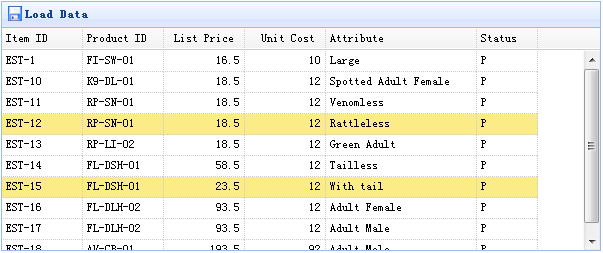
データグリッド(datagrid)コンポーネントには、選択行データを取得するための2つのメソッドがあります:
- getSelected:最初に選択された行のデータを取得します。選択された行がない場合は null を返し、それ以外の場合はレコードを返します。
- getSelections:選択されたすべての行のデータを取得し、レコードの配列を返します。
データグリッド(DataGrid)の作成
    <table id="tt" class="easyui-datagrid" style="width:600px;height:250px"
            url="data/datagrid_data.json"
            title="Load Data" iconCls="icon-save">
        <thead>
            <tr>
                <th field="itemid" width="80">Item ID</th>
                <th field="productid" width="80">Product ID</th>
                <th field="listprice" width="80" align="right">List Price</th>
                <th field="unitcost" width="80" align="right">Unit Cost</th>
                <th field="attr1" width="150">Attribute</th>
                <th field="status" width="60" align="center">Stauts</th>
            </tr>
        </thead>
    </table>
使用デモ
選択行データの取得:
    var row = $('#tt').datagrid('getSelected');
    if (row){
        alert('Item ID:'+row.itemid+"\nPrice:"+row.listprice);
    }
選択されたすべての行の itemid の取得:
    var ids = [];
    var rows = $('#tt').datagrid('getSelections');
    for(var i=0; i<rows.length; i++){
        ids.push(rows[i].itemid);
    }
    alert(ids.join('\n'));
jQuery EasyUI サンプルのダウンロード
jeasyui-datagrid-datagrid3.zip
その他の拡張機能