SQL FORMAT()Funktion
FORMAT() Funktion
Die FORMAT() Funktion wird verwendet, um die Anzeige eines Feldes zu formatieren.
SQL FORMAT() Syntax
SELECT FORMAT(column_name,format) FROM table_name;
| Parameter | Beschreibung |
|---|---|
| column_name | Erforderlich. Das zu formatierende Feld. |
| format | Erforderlich. Gibt das Format an. |
Demo-Datenbank
In diesem Tutorial verwenden wir die Beispieldatenbank EXAMPLE.
Nachfolgend ist eine Auswahl aus der Tabelle "Websites" aufgeführt:
+----+--------------+---------------------------+-------+---------+
| id | name         | url                       | alexa | country |
+----+--------------+---------------------------+-------+---------+
| 1  | Google       | https://www.google.cm/    | 1     | USA     |
| 2  | 淘宝          | https://www.taobao.com/   | 13    | CN      |
| 3  | Example      | http://www.example.com/    | 4689  | CN      |
| 4  | 微博          | http://weibo.com/         | 20    | CN      |
| 5  | Facebook     | https://www.facebook.com/ | 3     | USA     |
| 7  | stackoverflow | http://stackoverflow.com/ |   0 | IND     |
+----+---------------+---------------------------+-------+---------+
SQL FORMAT() Beispiel
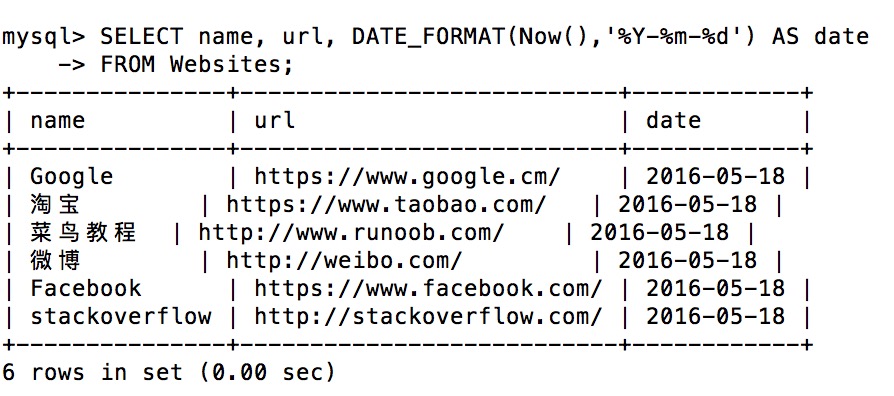
Die folgende SQL-Anweisung wählt name, url und das Datum formatiert als YYYY-MM-DD aus der Tabelle "Websites" aus:
Beispiel
SELECT name, url, DATE_FORMAT(Now(),'%Y-%m-%d') AS date
FROM Websites;
FROM Websites;
Die Ausführung des obigen SQL erzeugt die folgende Ausgabe: