jQuery EasyUI Menú de árbol -Agregar paginación a la cuadrícula de árbol
Este tutorial muestra cómo agregar paginación a una cuadrícula de árbol (TreeGrid) con carga dinámica.
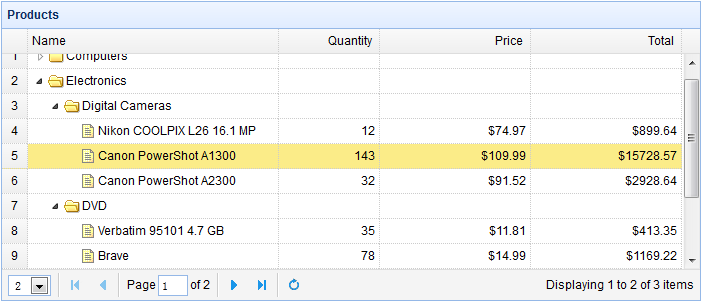
Crear una cuadrícula de árbol (TreeGrid)
Para habilitar la función de paginación de la cuadrícula de árbol (TreeGrid), se debe agregar el atributo 'pagination:true'. De esta manera, al cargar la página se enviarán los parámetros 'page' y 'rows' al servidor.
    <table title="Products" class="easyui-treegrid" style="width:700px;height:300px"
            data-options="
                url: 'treegrid4_getdata.php',
                rownumbers: true,
                pagination: true,
                pageSize: 2,
                pageList: [2,10,20],
                idField: 'id',
                treeField: 'name',
                onBeforeLoad: function(row,param){
                    if (!row) {    // load top level rows
                        param.id = 0;    // set id=0, indicate to load new page rows
                    }
                }
            ">
        <thead>
            <tr>
                <th field="name" width="250">Name</th>
                <th field="quantity" width="100" align="right">Quantity</th>
                <th field="price" width="150" align="right" formatter="formatDollar">Price</th>
                <th field="total" width="150" align="right" formatter="formatDollar">Total</th>
            </tr>
        </thead>
    </table>
Código del lado del servidor
treegrid4_getdata.php
$page = isset($_POST['page']) ? intval($_POST['page']) : 1;
$rows = isset($_POST['rows']) ? intval($_POST['rows']) : 10;
$offset = ($page-1)*$rows;

$id = isset($_POST['id']) ? intval($_POST['id']) : 0;

include 'conn.php';

$result = array();
if ($id == 0){
    $rs = mysql_query("select count(*) from products where parentId=0");
    $row = mysql_fetch_row($rs);
    $result["total"] = $row[0];

    $rs = mysql_query("select * from products where parentId=0 limit $offset,$rows");
    $items = array();
    while($row = mysql_fetch_array($rs)){
        $row['state'] = has_child($row['id']) ? 'closed' : 'open';
        array_push($items, $row);
    }
    $result["rows"] = $items;
} else {
    $rs = mysql_query("select * from products where parentId=$id");
    while($row = mysql_fetch_array($rs)){
        $row['state'] = has_child($row['id']) ? 'closed' : 'open';
        $row['total'] = $row['price']*$row['quantity'];
        array_push($result, $row);
    }
}

echo json_encode($result);

function has_child($id){
    $rs = mysql_query("select count(*) from products where parentId=$id");
    $row = mysql_fetch_array($rs);
    return $row[0] > 0 ? true : false;
}
Los parámetros enviados al servidor incluyen:
- page: la página actual que se va a cargar.
- rows: el tamaño de la página (número de filas).
- id: el valor de id de la fila padre, donde se agregarán las filas devueltas por el servidor.
Al expandir un nodo de fila, el valor de 'id' es mayor que 0. Al cambiar el número de página, el valor de 'id' debe establecerse en 0 para evitar cargar subfilas.
Descargar ejemplos de jQuery EasyUI
jeasyui-tree-treegrid4.zip
Otras extensiones