jQuery EasyUI Menú de árbol -Carga dinámica de TreeGrid
La carga dinámica de una cuadrícula de árbol (TreeGrid) ayuda a cargar datos de filas parciales desde el servidor, evitando largas esperas al cargar grandes volúmenes de datos. Este tutorial le mostrará cómo crear una cuadrícula de árbol (TreeGrid) con carga dinámica.
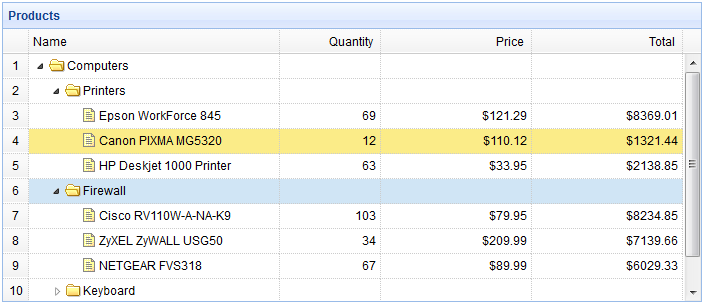
Crear una cuadrícula de árbol (TreeGrid)
    <table title="Products" class="easyui-treegrid" style="width:700px;height:300px"
            url="treegrid3_getdata.php"
            rownumbers="true"
            idField="id" treeField="name">
        <thead>
            <tr>
                <th field="name" width="250">Name</th>
                <th field="quantity" width="100" align="right">Quantity</th>
                <th field="price" width="150" align="right" formatter="formatDollar">Price</th>
                <th field="total" width="150" align="right" formatter="formatDollar">Total</th>
            </tr>
        </thead>
    </table>
Código del lado del servidor
treegrid3_getdata.php
$id = isset($_POST['id']) ? intval($_POST['id']) : 0;

include 'conn.php';
$result = array();
$rs = mysql_query("select * from products where parentId=$id");
while($row = mysql_fetch_array($rs)){
    $row['state'] = has_child($row['id']) ? 'closed' : 'open';
    $row['total'] = $row['price']*$row['quantity'];
    array_push($result, $row);
}

echo json_encode($result);

function has_child($id){
    $rs = mysql_query("select count(*) from products where parentId=$id");
    $row = mysql_fetch_array($rs);
    return $row[0] > 0 ? true : false;
}
Descargar ejemplos de jQuery EasyUI
jeasyui-tree-treegrid3.zip
Otras extensiones