jQuery EasyUI DataGrid -Crear subgrid
Usando la vista de detalles del DataGrid, el usuario puede expandir una fila para mostrar información adicional. Cualquier contenido puede cargarse como detalle de fila, y el subgrid también puede cargarse dinámicamente. Este tutorial le mostrará cómo crear un subgrid en el grid principal.
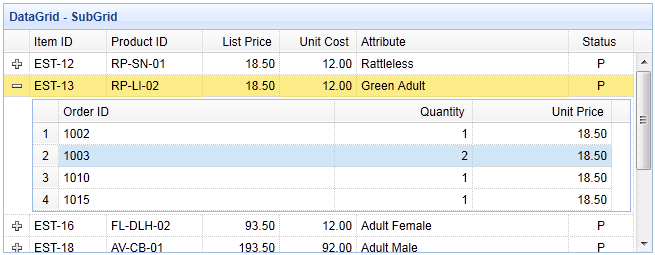
Paso 1: Crear el grid principal
<table id="dg" style="width:700px;height:250px"
        url="datagrid22_getdata.php"
        title="DataGrid - SubGrid"
        singleSelect="true" fitColumns="true">
    <thead>
        <tr>
            <th field="itemid" width="80">Item ID</th>
            <th field="productid" width="100">Product ID</th>
            <th field="listprice" align="right" width="80">List Price</th>
            <th field="unitcost" align="right" width="80">Unit Cost</th>
            <th field="attr1" width="220">Attribute</th>
            <th field="status" width="60" align="center">Status</th>
        </tr>
    </thead>
</table>
Paso 2: Configurar la vista de detalles para mostrar el subgrid
Para usar la vista de detalles, recuerde incluir la referencia al archivo de script de la vista en el encabezado de la página.
<script type="text/javascript" src="http://www.w3cschool.cc/try/jeasyui/datagrid-detailview.js"></script>
$('#dg').datagrid({
    view: detailview,
    detailFormatter:function(index,row){
        return '<div style="padding:2px"><table class="ddv"></table></div>';
    },
    onExpandRow: function(index,row){
        var ddv = $(this).datagrid('getRowDetail',index).find('table.ddv');
        ddv.datagrid({
            url:'datagrid22_getdetail.php?itemid='+row.itemid,
            fitColumns:true,
            singleSelect:true,
            rownumbers:true,
            loadMsg:'',
            height:'auto',
            columns:[[
                {field:'orderid',title:'Order ID',width:100},
                {field:'quantity',title:'Quantity',width:100},
                {field:'unitprice',title:'Unit Price',width:100}
            ]],
            onResize:function(){
                $('#dg').datagrid('fixDetailRowHeight',index);
            },
            onLoadSuccess:function(){
                setTimeout(function(){
                    $('#dg').datagrid('fixDetailRowHeight',index);
                },0);
            }
        });
        $('#dg').datagrid('fixDetailRowHeight',index);
    }
});
Cuando el usuario hace clic en el botón expandir ('+'), se activará el evento 'onExpandRow'. Creamos un nuevo subgrid con tres columnas. Cuando los datos del subgrid se carguen correctamente o cuando se cambie el tamaño, recuerde llamar al método 'fixDetailRowHeight' en el grid principal.
Paso 3: Código del lado del servidor
datagrid22_getdata.php
$result = array();

include 'conn.php';

$rs = mysql_query("select * from item where itemid in (select itemid from lineitem)");

$items = array();
while($row = mysql_fetch_object($rs)){
    array_push($items, $row);
}

echo json_encode($items);
datagrid22_getdetail.php
include 'conn.php';

$itemid = mysql_real_escape_string($_REQUEST['itemid']);

$rs = mysql_query("select * from lineitem where itemid='$itemid'");
$items = array();
while($row = mysql_fetch_object($rs)){
    array_push($items, $row);
}
echo json_encode($items);
Descargar ejemplos de jQuery EasyUI
jeasyui-datagrid-datagrid22.zip
Otras extensiones