IOS-Twitter y Facebook
Introducción
Twitter está integrado en iOS 5.0, y Facebook se ha integrado en iOS 6.0. Este tutorial se centra en explicar cómo utilizar las clases proporcionadas por Apple para implementar Twitter y Facebook en iOS 5.0 y iOS 6.0.
Pasos del ejemplo
1. Crear una aplicación simple basada en View
2. Seleccione el archivo del proyecto, luego seleccione "targets (objetivos)", y luego en "choose frameworks" (elección de frameworks) agregue Social.framework y Accounts.framework
3. Agregue dos botones llamados facebookPost y twitterPost, y cree ibActions para ellos.
4. Actualice ViewController.h de la siguiente manera
#import <Social/Social.h>
#import <Accounts/Accounts.h>
#import <UIKit/UIKit.h>

@interface ViewController : UIViewController

-(IBAction)twitterPost:(id)sender;
-(IBAction)facebookPost:(id)sender;

@end
5. Actualice ViewController.m, como se muestra a continuación.
#import "ViewController.h"

@interface ViewController ()

@end

@implementation ViewController

- (void)viewDidLoad
{
    [super viewDidLoad];
}

- (void)didReceiveMemoryWarning
{
    [super didReceiveMemoryWarning];
    // Dispose of any resources that can be recreated.
}

-(IBAction)facebookPost:(id)sender{

   SLComposeViewController *controller = [SLComposeViewController
   composeViewControllerForServiceType:SLServiceTypeFacebook];
   SLComposeViewControllerCompletionHandler myBlock =
   ^(SLComposeViewControllerResult result){
          if (result == SLComposeViewControllerResultCancelled)
          {
            NSLog(@"Cancelled");
          }
          else
          {
            NSLog(@"Done");
          }
          [controller dismissViewControllerAnimated:YES completion:nil];
        };
   controller.completionHandler =myBlock;
   //Adding the Text to the facebook post value from iOS
   [controller setInitialText:@"My test post"];
   //Adding the URL to the facebook post value from iOS
   [controller addURL:[NSURL URLWithString:@"http://www.test.com"]];
   //Adding the Text to the facebook post value from iOS
   [self presentViewController:controller animated:YES completion:nil];
}

-(IBAction)twitterPost:(id)sender{
    SLComposeViewController *tweetSheet = [SLComposeViewController
    composeViewControllerForServiceType:SLServiceTypeTwitter];
    [tweetSheet setInitialText:@"My test tweet"];
    [self presentModalViewController:tweetSheet animated:YES];
}

@end
Salida
Al ejecutar la aplicación y hacer clic en facebookPost, obtendremos la siguiente salida.

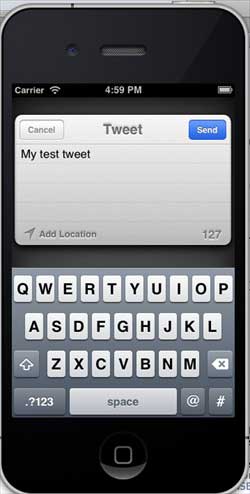
Cuando hacemos clic en twitterPost, obtendremos la siguiente salida.