PostgreSQL データベースの選択
前の章ではデータベースの作成方法について説明しました。次に、作成したデータベースを選択する方法について説明します。
データベースのコマンドウィンドウ
PostgreSQL コマンドウィンドウでは、コマンドプロンプトの後ろに SQL 文を入力できます:
postgres=#
使用 \l既存のデータベースを表示するために使用します:
postgres=# \l
                             List of databases
   Name    |  Owner   | Encoding | Collate | Ctype |   Access privileges
-----------+----------+----------+---------+-------+-----------------------
 postgres  | postgres | UTF8     | C       | C     |
 サンプルdb  | postgres | UTF8     | C       | C     |
 template0 | postgres | UTF8     | C       | C     | =c/postgres          +
           |          |          |         |       | postgres=CTc/postgres
 template1 | postgres | UTF8     | C       | C     | =c/postgres          +
           |          |          |         |       | postgres=CTc/postgres
(4 rows)
次に、以下を使用できます\c + データベース名でデータベースに入ります:
postgres=# \c サンプルdb
You are now connected to database "サンプルdb" as user "postgres".
サンプルdb=#
システムのコマンドラインウィンドウ
システムのコマンドラインで確認する場合、データベースに接続する際にデータベース名を追加することでデータベースを選択できます:
$ psql -h localhost -p 5432 -U postgres サンプルdb
Password for user postgres: ****
psql (11.3)
Type "help" for help.
You are now connected to database "サンプルdb" as user "postgres".
サンプルdb=#
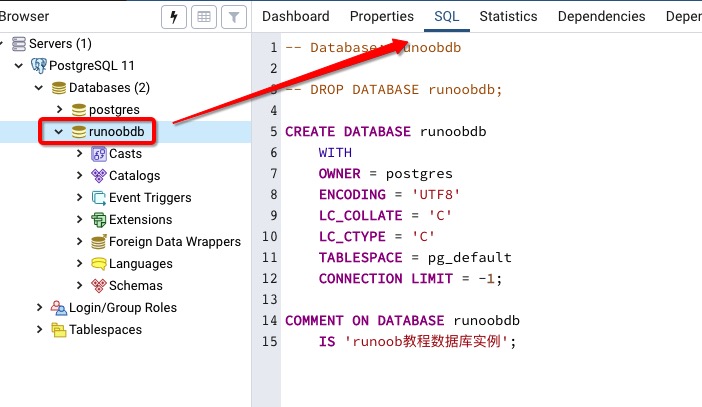
pgAdmin ツール
pgAdmin ツールはさらに簡単で、データベースをクリックして選択するだけです。データベースの追加情報も確認できます: