TypeScriptとは?
TypeScriptは、マイクロソフトが開発した自由かつオープンソースのプログラミング言語であり、JavaScriptのスーパーセットです。JavaScriptの構文を拡張しています。
構文の特徴
- クラス Classes
- インターフェース Interfaces
- モジュール Modules
- 型注釈 Type annotations
- コンパイル時の型チェック Compile time type checking
- アロー関数(C#のラムダ式に類似)
詳細は以下を参照してください:TypeScriptチュートリアル。
JavaScriptとTypeScriptの違い
TypeScriptはJavaScriptのスーパーセットであり、JavaScriptの構文を拡張しているため、既存のJavaScriptコードは修正なしでTypeScriptと一緒に動作します。TypeScriptは型注釈によりコンパイル時の静的型チェックを提供します。
TypeScriptは既存のJavaScriptコードを処理でき、その中のTypeScriptコードのみをコンパイルします。
TypeScriptのインストール
TypeScriptをインストールするには、次の2つの方法があります。
- Node.jsパッケージマネージャー(npm)を使用する
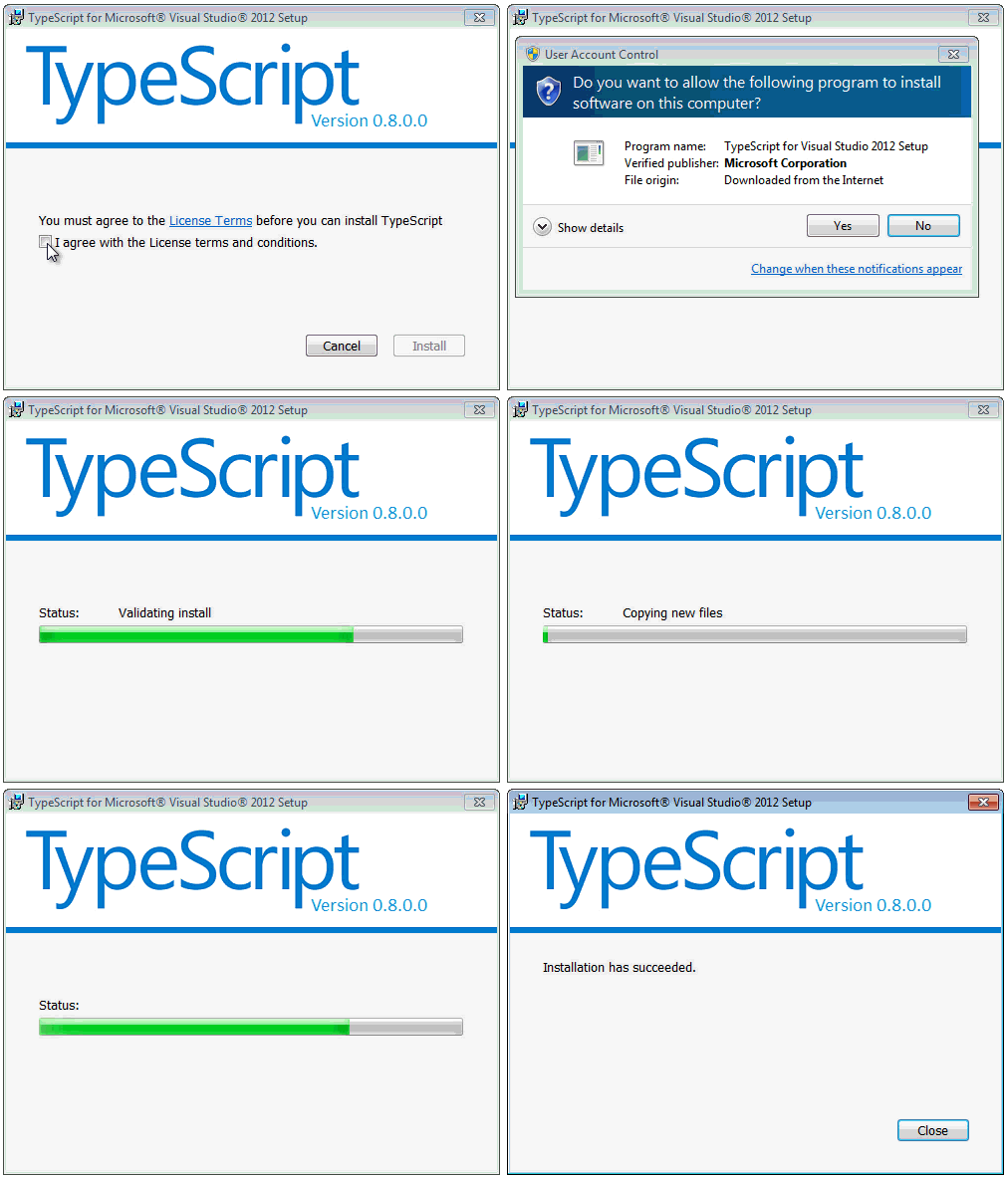
- Visual Studio 2012 と統合された MSI を使用する。 (クリックしてダウンロード)。
MSIファイルからインストールする場合の画面:
npmを使ってインストールする手順:
1. npmをインストールする
$ curl http://npmjs.org/install.sh | sh
$  npm --version
2.15.1
2. TypeScriptのnpmパッケージをインストールする:
$ npm install -g typescript
インストールが完了すると、TypeScriptコンパイラ(名前はtsc)を使用でき、コンパイル結果をjsファイルとして生成できます。
TypeScriptファイルをコンパイルするには、次のコマンドを使用します:
tsc filename.ts
コンパイルが成功すると、同じディレクトリに同名のjsファイルが生成されます。コマンドパラメータでデフォルトの出力名を変更することもできます。
デフォルトでは、コンパイラはECMAScript 3(ES3)をターゲットにしますが、ES5もサポートされるオプションです。TypeScriptは、今後予定されているECMAScript 6標準で提案されている機能のサポートを追加します。
TypeScript Hello World
まず、index.htmlファイルを作成します:
<!DOCTYPE html>
<html>
<head>
<meta charset="utf-8">
<title>Learning TypeScript</title>
</head>
<body>
    <script src="hello.js.html"></script>
</body>
</html>
hello.tsファイルを作成します。*.tsはTypeScriptファイルの拡張子です。hello.tsファイルに次のコードを追加します:
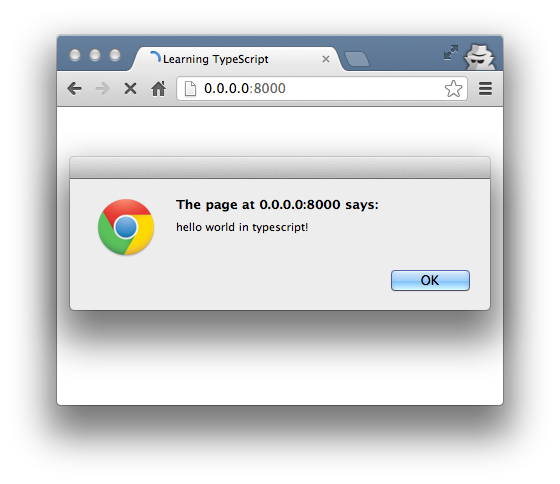
alert('hello world in TypeScript!');
次に、コマンドラインを開き、tscコマンドを使用してhello.tsファイルをコンパイルします:
$ tsc hello.ts
同じディレクトリにhello.jsファイルが生成されます。次にindex.htmlを開くと、出力結果は次のようになります:
型注釈
TypeScriptは型注釈により静的型を提供し、コンパイル時に型チェックを開始します。これはオプションであり、省略してJavaScriptの通常の動的型を使用することもできます。
function Add(left: number, right: number): number {
    return left + right;
}
基本型に対する注釈はnumber、bool、stringです。弱い型付けまたは動的型付けの構造はany型です。
型注釈は別の宣言ファイルにエクスポートでき、コンパイル済みのJavaScriptに変換されたTypeScriptスクリプトで使用される型情報を利用可能にします。注釈は既存のJavaScriptライブラリ用に宣言できます。これはNode.jsやjQueryに対して既に行われています。
型が指定されていない場合、TypeScriptコンパイラは型推論を利用して型を推測します。宣言が不足しているために型を推論できない場合は、デフォルトで動的なany型と見なされます。
例
次に、TypeScriptファイルtype.tsに簡単なarea()関数を作成します:
function area(shape: string, width: number, height: number) {
    var area = width * height;
    return "I'm a " + shape + " with an area of " + area + " cm squared.";
}

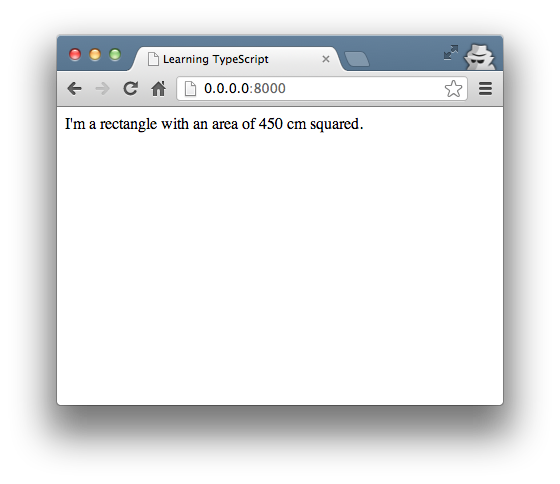
document.body.innerHTML = area("rectangle", 30, 15);
次に、index.htmlのjsファイルを次のように変更しますtype.js次にTypeScriptファイルをコンパイルします:tsc type.ts。
ブラウザでindex.htmlファイルを更新すると、出力結果は次のようになります:
インターフェース
次に、インターフェースを使用して上記の例を拡張します。interface.tsファイルを作成し、index.htmlのjsファイルを次のように変更しますinterface.js。
interface.jsファイルのコードは次のとおりです:
interface Shape {
    name: string;
    width: number;
    height: number;
    color?: string;
}

function area(shape : Shape) {
    var area = shape.width * shape.height;
    return "I'm " + shape.name + " with area " + area + " cm squared";
}

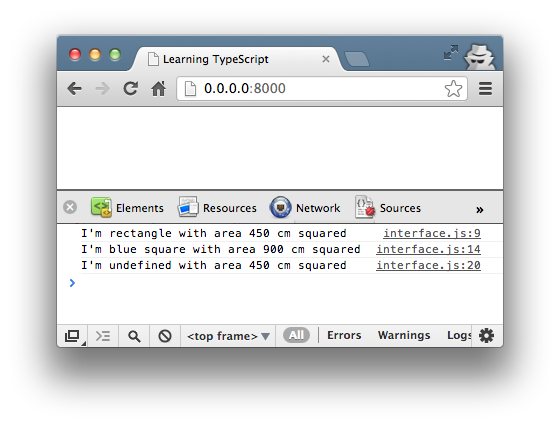
console.log( area( {name: "rectangle", width: 30, height: 15} ) );
console.log( area( {name: "square", width: 30, height: 30, color: "blue"} ) );
インターフェースは型注釈として使用できます。
上記のコードをコンパイルするとtsc interface.tsエラーは発生しませんが、上記のコードの後にnameパラメータが欠落した文を追加すると、コンパイル時にエラーが発生します:
console.log( area( {width: 30, height: 15} ) );
再コンパイルすると、エラー情報は次のようになります:
$ tsc hello.ts
hello.ts(15,20): error TS2345: Argument of type '{ width: number; height: number; }' is not assignable to parameter of type 'Shape'.
  Property 'name' is missing in type '{ width: number; height: number; }'.
ブラウザでアクセスすると、出力結果は次のようになります:
アロー関数式(ラムダ式)
ラムダ式()=>{something} または ()=>somethingJSの関数に相当します。利点は、関数内のthisを自動的にコンテキストに結び付けることができることです。
以下を実行してみてください:
var shape = {
    name: "rectangle",
    popup: function() {

        console.log('This inside popup(): ' + this.name);

        setTimeout(function() {
            console.log('This inside setTimeout(): ' + this.name);
            console.log("I'm a " + this.name + "!");
        }, 3000);

    }
};

shape.popup();
この例のthis.nameは空の値です:
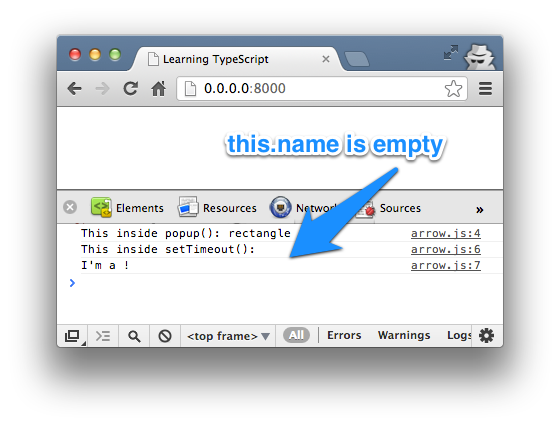
次に、TypeScriptのアロー関数を使用します。次のコードをfunction()次のコードに置き換えます() =>:
var shape = {
    name: "rectangle",
    popup: function() {

        console.log('This inside popup(): ' + this.name);

        setTimeout( () => {
            console.log('This inside setTimeout(): ' + this.name);
            console.log("I'm a " + this.name + "!");
        }, 3000);

    }
};

shape.popup();
出力結果は次のようになります:
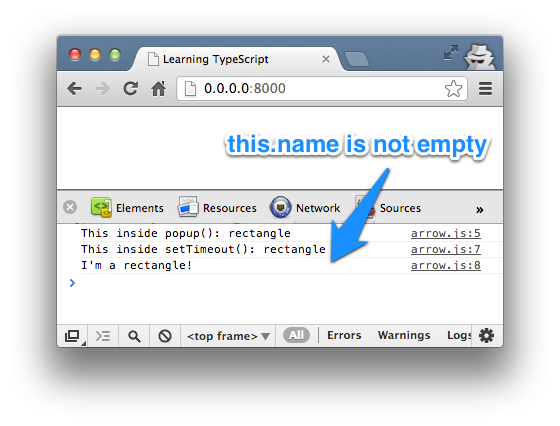
上記の例をコンパイルした後のjsファイルには、次のような行がありますvar _this = this;,_thissetTimeout()のコールバック関数内でnameプロパティを参照しています。
类
TypeScriptは、オプションの型注釈サポートを統合したECMAScript 6のクラスをサポートしています。
次に、クラスファイルclass.tsを作成します。コードは次のとおりです:
class Shape {

    area: number;
    color: string;

    constructor ( name: string, width: number, height: number ) {
        this.area = width * height;
        this.color = "pink";
    };

    shoutout() {
        return "I'm " + this.color + " " + this.name +  " with an area of " + this.area + " cm squared.";
    }
}

var square = new Shape("square", 30, 30);

console.log( square.shoutout() );
console.log( 'Area of Shape: ' + square.area );
console.log( 'Name of Shape: ' + square.name );
console.log( 'Color of Shape: ' + square.color );
console.log( 'Width of Shape: ' + square.width );
console.log( 'Height of Shape: ' + square.height );
上記のShapeクラスには、2つのプロパティareaとcolor、1つのコンストラクタ(constructor())、1つのメソッドshoutout()があります。
コンストラクタ内のパラメータ(name、width、height)のスコープはローカル変数であるため、上記のファイルをコンパイルすると、ブラウザでは次のようなエラー出力が表示されます:
class.ts(12,42): The property 'name' does not exist on value of type 'Shape'
class.ts(20,40): The property 'name' does not exist on value of type 'Shape'
class.ts(22,41): The property 'width' does not exist on value of type 'Shape'
class.ts(23,42): The property 'height' does not exist on value of type 'Shape'
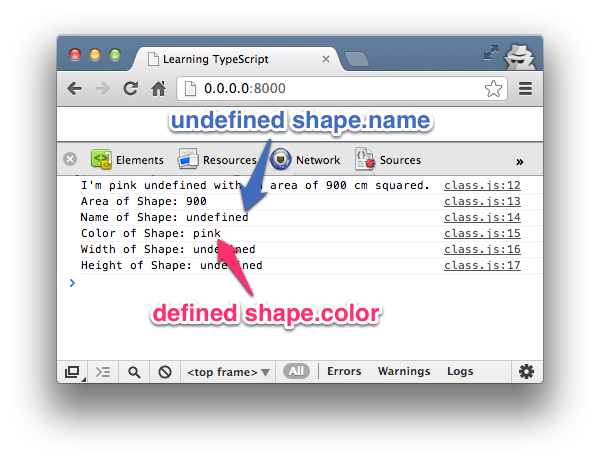
次に、publicおよびprivateアクセス修飾子を追加します。publicメンバーはどこからでもアクセスでき、privateメンバーはクラス内でのみアクセスできます。
次に、上記のコードを変更して、colorをprivateとして宣言し、コンストラクタのパラメータnameをpublicとして宣言します:
...
private color: string;
...
constructor ( public name: string, width: number, height: number ) {
...
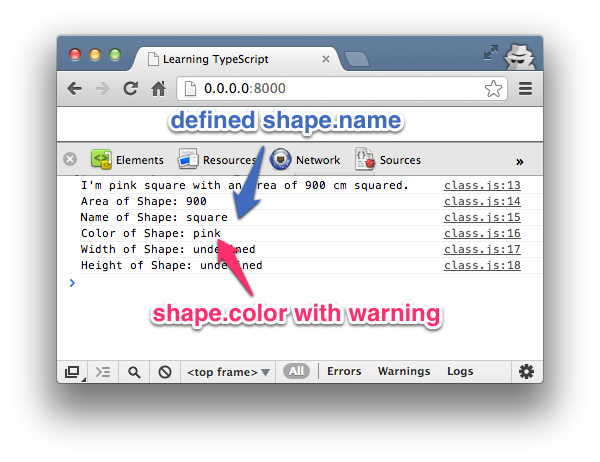
colorメンバー変数がprivateに設定されているため、次のような情報が表示されます:
class.ts(24,41): The property 'color' does not exist on value of type 'Shape'
継承
最後に、既存のクラスを継承して派生クラスを作成できます。継承にはキーワードextends。
次に、class.tsファイルの末尾に次のコードを追加します。以下に示します:
class Shape3D extends Shape {

    volume: number;

    constructor ( public name: string, width: number, height: number, length: number ) {
        super( name, width, height );
        this.volume = length * this.area;
    };

    shoutout() {
        return "I'm " + this.name +  " with a volume of " + this.volume + " cm cube.";
    }

    superShout() {
        return super.shoutout();
    }
}

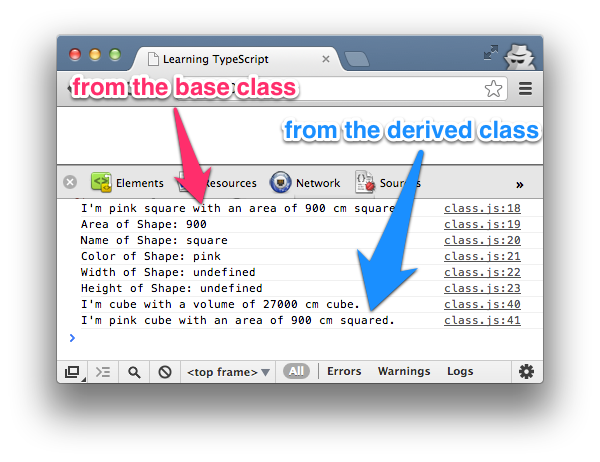
var cube = new Shape3D("cube", 30, 30, 30);
console.log( cube.shoutout() );
console.log( cube.superShout() );
派生クラスShape3Dの説明:
- Shape3DはShapeクラスを継承し、Shapeクラスのcolorプロパティも継承します。
- コンストラクタ内で、superメソッドは基底クラスShapeのコンストラクタを呼び出し、パラメータname、width、heightの値を渡します。継承によりShapeクラスのコードを再利用できるため、areaプロパティを継承してthis.volumeを計算できます。
- Shape3Dのshoutout()メソッドは基底クラスの実装をオーバーライドします。superShout()メソッドはsuperキーワードを使用して基底クラスのshoutout()メソッドを直接返します。
- その他のコードは、自分のニーズに応じて必要な機能を実装できます。
参考ドキュメント
- TypeScript中国語マニュアル:http://www.example.com/manual/gitbook/TypeScript/_book/
- http://code.tutsplus.com/tutorials/getting-started-with-typescript--net-28890
- https://zh.wikipedia.org/wiki/TypeScript