Pinia入門チュートリアル
Vue3では、状態管理は避けて通れない話題です。
Pinia は Vue.js の軽量な状態管理ライブラリで、コンポーネント間で状態を共有・管理できるようにします。Pinia はグローバルなデータ倉庫と考えることができ、すべてのコンポーネントがここからデータを取得したり更新したりできます。
この章では、Vue3 公式が推奨する状態管理ライブラリ —— Pinia を紹介します。Vuex と比較して、Pinia はよりシンプルで、Vue3 の Composition API の考え方に合った状態管理ソリューションを提供します。
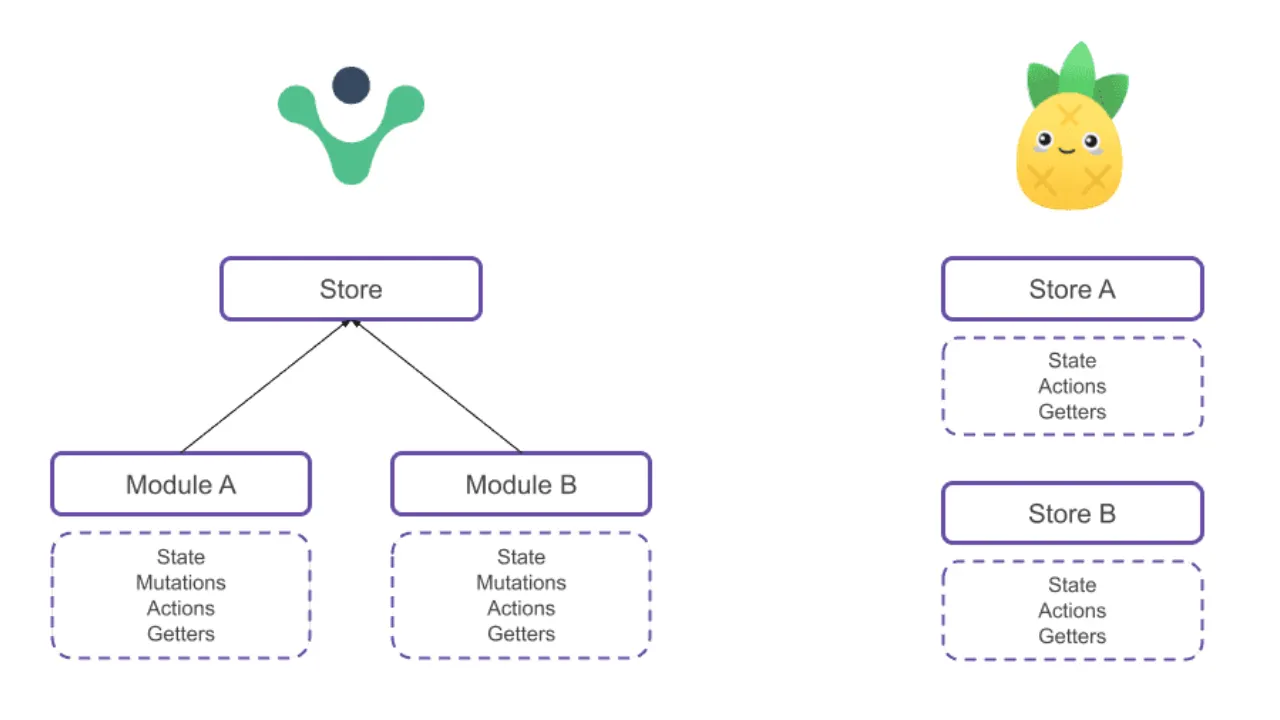
次の図は、両者の構造の違いを比較したものです。
- Vuexは単一ストアに多階層モジュールを加えたツリー構造を採用しており、階層が固定され、mutationsに依存するため、全体的に重くなっています。
- Piniaは複数の独立したStoreで構成され、フラットで軽量、モジュール分けがなく、ネームスペースの負担もありません。
Piniaの主な特徴:
- Vue2とVue3をサポート
- シンプルなAPI設計
- 完全なTypeScriptサポート
- コンポジションAPIをサポート
- モジュール化設計、モジュールのネストは不要
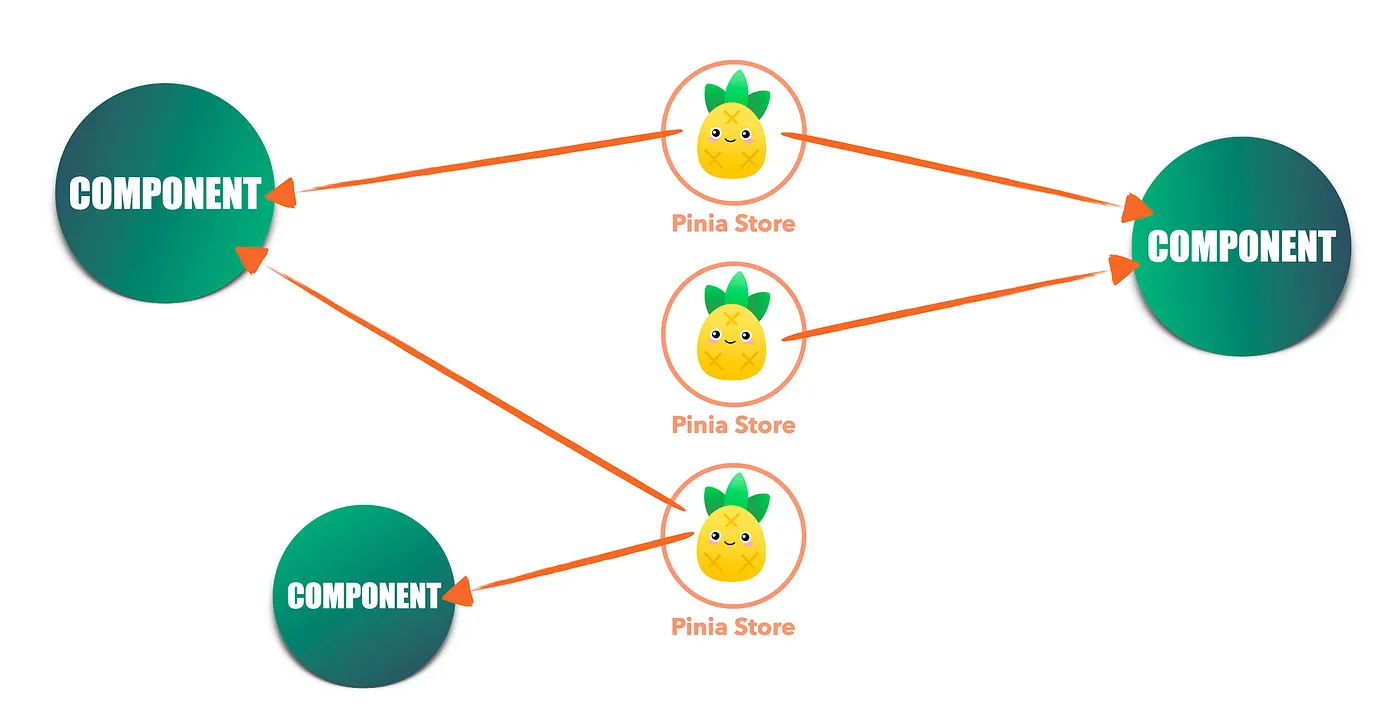
Piniaのフラットな構造により、コンポーネントは任意のStoreに直接接続でき、必要なものを自由に取得できます。ツリー状のモジュールやネームスペースのパスを経由しないため、状態の流れはシンプルかつ直接的で、結合度が低くなります。
インストールと設定
Viteでプロジェクトを作成:
npm create vite@latest vue-pinia-demo --template vue
cd vue-pinia-demo
npm install
Piniaのインストール
まず、Vue3プロジェクトにPiniaをインストールします:
npm install pinia
# 或者
yarn add pinia
Piniaには3つの部分があります:
- state:データを格納
- getters:派生データを計算
- actions:ロジックを実行し、stateを変更
配置 Pinia
src/main.js または src/main.ts で Pinia を設定します:
实例
import { createApp } from 'vue'
import { createPinia } from 'pinia'
import App from './App.vue'
// 创建 Pinia 实例
const pinia = createPinia()
// 创建 Vue 应用
const app = createApp(App)
// 使用 Pinia
app.use(pinia)
app.mount('#app')
最初のStoreを作成
StoreはPiniaにおけるデータの保管庫です。簡単なカウンターStoreを作成してみましょう。
定义 Store
新建 src/stores/useCounter.js:
实例
import { defineStore } from 'pinia'
// 使用 defineStore 定义 store
// 最初の引数は store の一意の ID です
// 2 番目のパラメータは store の設定オプションです
export const useCounterStore = defineStore('counter', {
// state: store の状態データを定義する
state: () => ({
count: 0,
name: 'マイカウンター'
}),
// getters: state に基づく算出プロパティを定義します
getters: {
doubleCount: (state) => state.count * 2,
// 使用 this 访问其他 getter
doubleCountPlusOne() {
return this.doubleCount + 1
}
},
// actions: state を変更するメソッドを定義します
actions: {
increment() {
this.count++
},
decrement() {
this.count--
},
// 可以接收参数
incrementBy(amount) {
this.count += amount
},
// 异步 action
async incrementAsync() {
// 模拟异步操作
await new Promise(resolve => setTimeout(resolve, 1000))
this.count++
}
}
})
Storeの構造の説明
表を使ってStoreの各部分を理解しましょう:
| 部分 | 作用 | 示例 |
|---|---|---|
| state | 保存するデータの定義 | count: 0 |
| getters | stateに基づく算出プロパティ | doubleCount: state => state.count * 2 |
| actions | stateを変更するメソッド | increment() { this.count++ } |
コンポーネントでStoreを使用
基本使用
src/components/CounterComponent.vue 组件代码如下:
实例
<template>
<div class="counter">
<h3>{{ store.name }}</h3>
<p>当前计数: {{ store.count }}</p>
<p>双倍计数: {{ store.doubleCount }}</p>
<p>双倍加一: {{ store.doubleCountPlusOne }}</p>
<button @click="store.increment()">+1</button>
<button @click="store.decrement()">-1</button>
<button @click="store.incrementBy(5)">+5</button>
<button @click="store.incrementAsync()">异步 +1</button>
<button @click="reset">重置</button>
</div>
</template>
<script setup>
import { useCounterStore } from '../stores/useCounter'
// setup で store を使用する
const store = useCounterStore()
// 状態をリセットする方法
function reset() {
store.$reset() // $reset 方法可以重置 state 到初始值
}
</script>
src/App.vueを以下のように変更:
实例
import CounterComponent from './components/CounterComponent.vue'
</script>
<template>
<CounterComponent />
</template>
プロジェクト全体の構造:

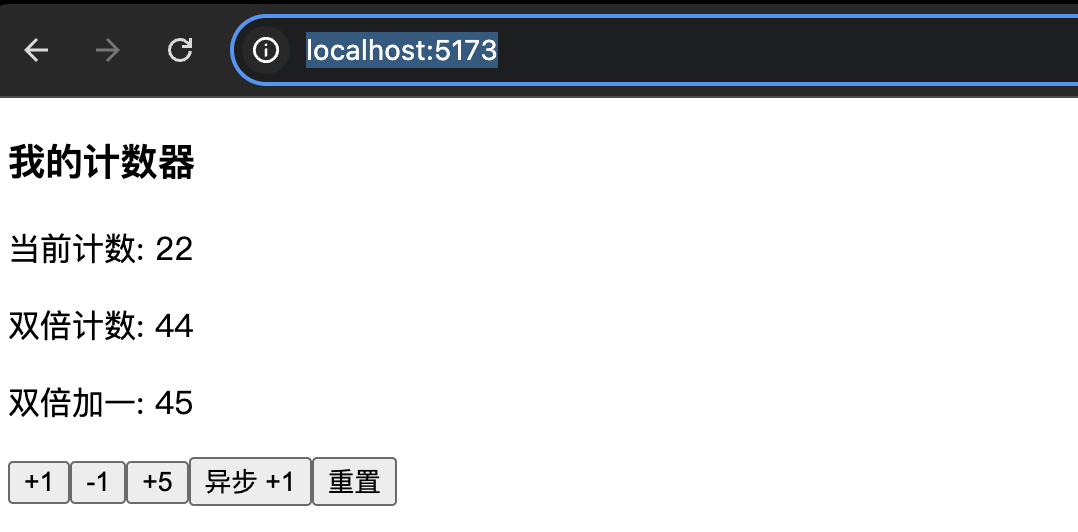
执行npm run devコマンドを実行し、ブラウザでアクセスします。http://localhost:5173/、動作を確認:
响应式解构
テンプレート内でstateのプロパティを直接使用したい場合は、次を使用できます。storeToRefs:
实例
<div>
<p>计数: {{ count }}</p>
<p>名称: {{ name }}</p>
</div>
</template>
<script setup>
import { storeToRefs } from 'pinia'
import { useCounterStore } from '@/stores/counter'
const store = useCounterStore()
// 使用 storeToRefs 保持响应式
const { count, name } = storeToRefs(store)
// 注意:直接解构会失去响应式!
// 错误写法:const { count, name } = store
</script>
コンポジションAPIスタイルのStore
PiniaはコンポジションAPIスタイルでStoreを定義することもサポートしています:
实例
import { defineStore } from 'pinia'
import { ref, computed } from 'vue'
export const useUserStore = defineStore('user', () => {
// state
const user = ref(null)
const isLoggedIn = ref(false)
// getters
const userName = computed(() => user.value?.name || '游客')
const userAge = computed(() => user.value?.age || 0)
// actions
function login(userData) {
user.value = userData
isLoggedIn.value = true
}
function logout() {
user.value = null
isLoggedIn.value = false
}
return {
user,
isLoggedIn,
userName,
userAge,
login,
logout
}
})
Store同士の連携
複数のStoreは相互に呼び出すことができます:
实例
import { defineStore } from 'pinia'
import { useUserStore } from './user'
export const useCartStore = defineStore('cart', {
state: () => ({
items: []
}),
actions: {
addItem(product) {
this.items.push(product)
// 他の store の action を呼び出す
const userStore = useUserStore()
if (userStore.isLoggedIn) {
// 同步到用户购物车
this.syncToUserCart()
}
}
}
})
実践的な応用例:ショッピングカート
完全なショッピングカートの例を作成しましょう:
实例
export const useProductStore = defineStore('products', {
state: () => ({
products: [
{ id: 1, name: '笔记本电脑', price: 5999, stock: 10 },
{ id: 2, name: '智能手机', price: 3999, stock: 20 },
{ id: 3, name: '无线耳机', price: 299, stock: 50 }
]
}),
getters: {
// 根据 ID 获取商品
getProductById: (state) => (id) => {
return state.products.find(product => product.id === id)
},
// に庫のある商品を取得
availableProducts: (state) => {
return state.products.filter(product => product.stock > 0)
}
}
})
实例
export const useCartStore = defineStore('cart', {
state: () => ({
items: [], // { productId, quantity }
discount: 0
}),
getters: {
// 购物车商品总数
totalItems: (state) => {
return state.items.reduce((total, item) => total + item.quantity, 0)
},
// 购物车总金额
totalPrice: (state) => {
const productStore = useProductStore()
return state.items.reduce((total, item) => {
const product = productStore.getProductById(item.productId)
return total + (product?.price || 0) * item.quantity
}, 0)
},
// 折后总价
finalPrice: (state) => {
return state.totalPrice * (1 - state.discount / 100)
}
},
actions: {
// 添加商品到购物车
addToCart(productId, quantity = 1) {
const existingItem = this.items.find(item => item.productId === productId)
if (existingItem) {
existingItem.quantity += quantity
} else {
this.items.push({ productId, quantity })
}
},
// カートから商品を削除
removeFromCart(productId) {
this.items = this.items.filter(item => item.productId !== productId)
},
// 清空购物车
clearCart() {
this.items = []
this.discount = 0
},
// 设置折扣
setDiscount(percent) {
this.discount = Math.max(0, Math.min(100, percent))
}
}
})
コンポーネントでショッピングカートを使用
实例
<template>
<div class="shopping-cart">
<h3>购物车 ({{ cart.totalItems }} 件商品)</h3>
<div v-if="cart.items.length === 0">
<p>カートが空です</p>
</div>
<div v-else>
<div v-for="item in cartItems" :key="item.product.id" class="cart-item">
<span>{{ item.product.name }}</span>
<span>¥{{ item.product.price }}</span>
<span>数量: {{ item.quantity }}</span>
<span>小计: ¥{{ item.product.price * item.quantity }}</span>
<button @click="cart.removeFromCart(item.product.id)">删除</button>
</div>
<div class="cart-summary">
<p>总价: ¥{{ cart.totalPrice }}</p>
<p v-if="cart.discount >0">折扣: {{ cart.discount }}%</p>
<p>实付: ¥{{ cart.finalPrice }}</p>
</div>
</div>
</div>
</template>
<script setup>
import { computed } from 'vue'
import { useCartStore } from '@/stores/cart'
import { useProductStore } from '@/stores/products'
const cart = useCartStore()
const products = useProductStore()
// 计算购物车商品详情
const cartItems = computed(() => {
return cart.items.map(item => ({
product: products.getProductById(item.productId),
quantity: item.quantity
})).filter(item => item.product) // 存在しない商品をフィルタリングする
})
</script>
ベストプラクティスと注意事項
1. Storeの命名規約
实例
export const useUserStore = defineStore('user', { /* ... */ })
export const useProductStore = defineStore('products', { /* ... */ })
// 避けるべき命名
export const userStore = defineStore('user', { /* ... */ }) // 缺少 use 前缀
2. 状態の初期化
实例
state: () => ({
items: [],
loading: false,
error: null
})
// 非推奨:オブジェクトを直接使用する
state: {
items: [] // これにより、すべてのインスタンスが同じ配列を共有することになります!
}
3. 非同期操作の処理
实例
async fetchUserData(userId) {
this.loading = true
this.error = null
try {
const response = await api.getUser(userId)
this.user = response.data
} catch (error) {
this.error = error.message
} finally {
this.loading = false
}
}
}
4. データの永続化
永続化が必要なデータには、プラグインを使用できます:
npm install pinia-plugin-persistedstate
实例
import piniaPluginPersistedstate from 'pinia-plugin-persistedstate'
const pinia = createPinia()
pinia.use(piniaPluginPersistedstate)
export const useUserStore = defineStore('user', {
state: () => ({
token: '',
userInfo: {}
}),
// 永続化を有効にする
persist: true
})
Pinia API
| カテゴリ | API | 説明 |
|---|---|---|
| 作成 | defineStore |
独立した store を定義し、state / getters / actions を含める |
| インスタンス化 | createPinia |
Pinia ルートインスタンスを作成し、app.use() に使用する |
| コンポーネントでの使用 | useStore()(ユーザー定義、例:useUserStore) |
特定の store を呼び出し、リアクティブな state、getter、action を返す |
| 状態 | state |
可変なグローバル状態を定義するためのオブジェクト関数を返す |
| 状態操作 | store.$state |
state全体を直接読み書きする(オブジェクトレベル) |
| 状態操作 | store.$patch() |
state を一括変更し、オブジェクトと関数の2つのモードをサポート |
| 状態の置き換え | store.$reset() |
初期 state にリセットします。setup 方式で定義した場合のみ使用可能 |
| 状態の購読 | store.$subscribe() |
state の変化を監視し、ローカル永続化に適している |
| Action の呼び出し | store.$onAction() |
action の呼び出し前後を監視し、ログやトラッキングに利用できる |
| Getter | getters |
派生データ。state に基づいて自動的にキャッシュされる |
| プラグイン | pinia.use() |
プラグインを登録して、store の機能を拡張する |
| 定義方法 | defineStore(id, options) |
Options API での記述方法 |
| 定義方法 | defineStore(id, () => {...}) |
Setup での記述方法。state / getter / action を返す |
| Store のプロパティ | store.$id |
現在の store の一意の識別子 |
| Store のプロパティ | store.$ready(一部のバージョン) |
Store の初期化完了後の状態フラグ |
| 永続化(プラグイン) | persist |
ストレージプラグインを有効にする(localStorage など) |
| ユーティリティ関数 | storeToRefs() |
state / getter を refs に変換し、リアクティブ性を維持する |
その他の拡張詳細は Pinia 公式サイトを参照:https://pinia.vuejs.org/