iOS位置情報操作
概要
IOSではCoreLocationを使用して位置情報を取得し、ユーザーの現在位置とデバイスの移動情報を取得できます。
実装手順
1、シンプルなView based application(ビューアプリケーション)を作成します。
2、プロジェクトファイルを選択し、ターゲットを選択して、CoreLocation.frameworkを追加します。以下のようになります。
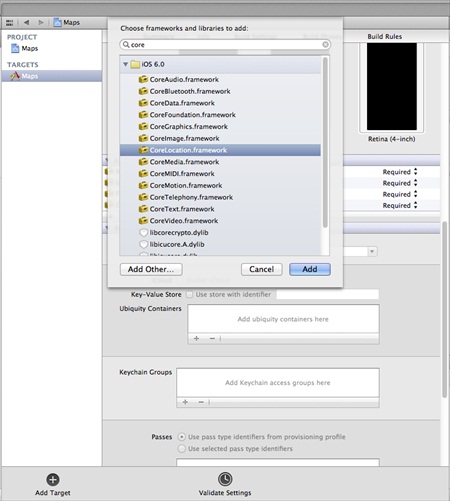
3、ViewController.xibに2つのラベルを追加し、latitudeLabelとlongtitudeLabelという名前のibOutletを作成します。
4、"File-> New -> File... ->"を選択し、"Objective C class"を選択して「次へ」をクリックします。
5、"sub class of"をNSObjectに設定し、クラス名をLocationHandlerにします。
6、「作成」を選択します。
7、LocationHandler.hを以下のように更新します。
#import <Foundation/Foundation.h>
#import <CoreLocation/CoreLocation.h>

@protocol LocationHandlerDelegate <NSObject>

@required
-(void) didUpdateToLocation:(CLLocation*)newLocation
 fromLocation:(CLLocation*)oldLocation;
@end

@interface LocationHandler : NSObject<CLLocationManagerDelegate>
{
    CLLocationManager *locationManager;
}
@property(nonatomic,strong) id<LocationHandlerDelegate> delegate;

+(id)getSharedInstance;
-(void)startUpdating;
-(void) stopUpdating;

@end
8、LocationHandler.mを以下のように更新します。
#import "LocationHandler.h"
static LocationHandler *DefaultManager = nil;

@interface LocationHandler()

-(void)initiate;

@end

@implementation LocationHandler

+(id)getSharedInstance{
    if (!DefaultManager) {
        DefaultManager = [[self allocWithZone:NULL]init];
        [DefaultManager initiate];
    }
    return DefaultManager;
}
-(void)initiate{
    locationManager = [[CLLocationManager alloc]init];
    locationManager.delegate = self;
}

-(void)startUpdating{
    [locationManager startUpdatingLocation];
}

-(void) stopUpdating{
    [locationManager stopUpdatingLocation];
}
-(void)locationManager:(CLLocationManager *)manager didUpdateToLocation:
 (CLLocation *)newLocation fromLocation:(CLLocation *)oldLocation{
    if ([self.delegate respondsToSelector:@selector
    (didUpdateToLocation:fromLocation:)])
    {
        [self.delegate didUpdateToLocation:oldLocation
        fromLocation:newLocation];

    }
}

@end
9、ViewController.hを以下のように更新します。
#import <UIKit/UIKit.h>
#import "LocationHandler.h"
@interface ViewController : UIViewController<LocationHandlerDelegate>
{
    IBOutlet UILabel *latitudeLabel;
    IBOutlet UILabel *longitudeLabel;
}
@end
10、ViewController.mを以下のように更新します。
#import "ViewController.h"

@interface ViewController ()

@end

@implementation ViewController

- (void)viewDidLoad
{
    [super viewDidLoad];
    [[LocationHandler getSharedInstance]setDelegate:self];
    [[LocationHandler getSharedInstance]startUpdating];
}

- (void)didReceiveMemoryWarning
{
    [super didReceiveMemoryWarning];
    // Dispose of any resources that can be recreated.
}

-(void)didUpdateToLocation:(CLLocation *)newLocation
 fromLocation:(CLLocation *)oldLocation{
    [latitudeLabel setText:[NSString stringWithFormat:
    @"Latitude: %f",newLocation.coordinate.latitude]];
    [longitudeLabel setText:[NSString stringWithFormat:
    @"Longitude: %f",newLocation.coordinate.longitude]];

}

@end
出力
このアプリケーションを実行すると、次のような出力が得られます:
