Python コンポジットパターン
コンポジットパターンは構造型デザインパターンの一つで、オブジェクトをツリー構造に組み合わせて「部分-全体」の階層構造を表現できるようにします。コンポジットパターンにより、クライアントは単一オブジェクトとオブジェクトの組み合わせを統一的に扱うことができ、処理対象が単一オブジェクトか全体の組み合わせ構造かを気にする必要がありません。
生活でのたとえ
ファイルシステムの組織構造を想像してみてください:
- 単一ファイル:最も基本的な単位です
- フォルダ:複数のファイルや他のフォルダを含めることができます
- ファイルでもフォルダでも、「開く」「削除」「名前の変更」などの操作を行うことができます
このような「部分-全体」の階層関係が、コンポジットパターンの典型的な適用シーンです。
コンポジットパターンの核心コンポーネント
1. コンポーネントインターフェース(Component)
これはコンポジットパターンの核心であり、すべてのオブジェクト(リーフノードとコンポジットノードを含む)の共通インターフェースを定義します。
例
from abc import ABC, abstractmethod
from typing import List
class FileSystemComponent(ABC):
"""ファイルシステムコンポーネント抽象基底クラス"""
def __init__(self, name: str):
self.name = name
self.parent = None
@abstractmethod
def display(self, indent: int = 0) -> None:
"""コンポーネント情報を表示"""
pass
@abstractmethod
def get_size(self) -> int:
"""コンポーネントのサイズを取得"""
pass
def get_path(self) -> str:
"""完全なパスを取得"""
if self.parent:
return f"{self.parent.get_path()}/{self.name}"
return self.name
from typing import List
class FileSystemComponent(ABC):
"""ファイルシステムコンポーネント抽象基底クラス"""
def __init__(self, name: str):
self.name = name
self.parent = None
@abstractmethod
def display(self, indent: int = 0) -> None:
"""コンポーネント情報を表示"""
pass
@abstractmethod
def get_size(self) -> int:
"""コンポーネントのサイズを取得"""
pass
def get_path(self) -> str:
"""完全なパスを取得"""
if self.parent:
return f"{self.parent.get_path()}/{self.name}"
return self.name
2. リーフノード(Leaf)
組み合わせ内のリーフオブジェクトを表します。リーフノードには子ノードがありません。
例
class File(FileSystemComponent):
"""ファイルクラス - リーフノード"""
def __init__(self, name: str, size: int):
super().__init__(name)
self._size = size
def display(self, indent: int = 0) -> None:
"""ファイル情報を表示"""
spaces = " " * indent
print(f"{spaces}📄 {self.name} ({self._size} bytes)")
def get_size(self) -> int:
"""ファイルサイズを返す"""
return self._size
"""ファイルクラス - リーフノード"""
def __init__(self, name: str, size: int):
super().__init__(name)
self._size = size
def display(self, indent: int = 0) -> None:
"""ファイル情報を表示"""
spaces = " " * indent
print(f"{spaces}📄 {self.name} ({self._size} bytes)")
def get_size(self) -> int:
"""ファイルサイズを返す"""
return self._size
3. コンポジットノード(Composite)
子コンポーネントを含めることができる組み合わせオブジェクトを表し、子コンポーネントを格納するメソッドを定義します。
例
class Directory(FileSystemComponent):
"""ディレクトリクラス - コンポジットノード"""
def __init__(self, name: str):
super().__init__(name)
self._children: List[FileSystemComponent] = []
def add(self, component: FileSystemComponent) -> None:
"""子コンポーネントを追加"""
component.parent = self
self._children.append(component)
def remove(self, component: FileSystemComponent) -> None:
"""子コンポーネントを削除"""
self._children.remove(component)
component.parent = None
def display(self, indent: int = 0) -> None:
"""ディレクトリとそのすべての子コンポーネントを表示"""
spaces = " " * indent
print(f"{spaces}📁 {self.name}/")
# すべての子コンポーネントを再帰的に表示
for child in self._children:
child.display(indent + 1)
def get_size(self) -> int:
"""ディレクトリの合計サイズを計算(すべての子コンポーネントを含む)"""
total_size = 0
for child in self._children:
total_size += child.get_size()
return total_size
def find_component(self, name: str) -> FileSystemComponent:
"""指定された名前のコンポーネントを検索"""
for child in self._children:
if child.name == name:
return child
if isinstance(child, Directory):
found = child.find_component(name)
if found:
return found
return None
"""ディレクトリクラス - コンポジットノード"""
def __init__(self, name: str):
super().__init__(name)
self._children: List[FileSystemComponent] = []
def add(self, component: FileSystemComponent) -> None:
"""子コンポーネントを追加"""
component.parent = self
self._children.append(component)
def remove(self, component: FileSystemComponent) -> None:
"""子コンポーネントを削除"""
self._children.remove(component)
component.parent = None
def display(self, indent: int = 0) -> None:
"""ディレクトリとそのすべての子コンポーネントを表示"""
spaces = " " * indent
print(f"{spaces}📁 {self.name}/")
# すべての子コンポーネントを再帰的に表示
for child in self._children:
child.display(indent + 1)
def get_size(self) -> int:
"""ディレクトリの合計サイズを計算(すべての子コンポーネントを含む)"""
total_size = 0
for child in self._children:
total_size += child.get_size()
return total_size
def find_component(self, name: str) -> FileSystemComponent:
"""指定された名前のコンポーネントを検索"""
for child in self._children:
if child.name == name:
return child
if isinstance(child, Directory):
found = child.find_component(name)
if found:
return found
return None
完全な例:ファイルシステムのシミュレーション
完全な例を通して、コンポジットパターンの実際の応用をデモンストレーションしましょう:
例
def demonstrate_composite_pattern():
"""コンポジットパターンの使用をデモンストレーション"""
# ルートディレクトリを作成
root = Directory("root")
# サブディレクトリを作成
documents = Directory("documents")
pictures = Directory("pictures")
music = Directory("music")
# ファイルを作成
readme = File("README.txt", 1024)
notes = File("notes.md", 2048)
photo1 = File("vacation.jpg", 1536000)
photo2 = File("family.png", 2048000)
song1 = File("song1.mp3", 4096000)
song2 = File("song2.mp3", 5120000)
# ディレクトリ構造を構築
root.add(readme)
root.add(documents)
root.add(pictures)
root.add(music)
documents.add(notes)
pictures.add(photo1)
pictures.add(photo2)
music.add(song1)
music.add(song2)
# ファイルシステム全体の構造を表示
print("=== ファイルシステム構造 ===")
root.display()
print("\n=== サイズ統計 ===)
print(f"ルートディレクトリの合計サイズ: {root.get_size()} bytes")
print(f"画像ディレクトリのサイズ: {pictures.get_size()} bytes")
print(f"音楽ディレクトリのサイズ: {music.get_size()} bytes")
print("\n=== パス情報 ===)
print(f"ファイルパス: {photo1.get_path()}")
print(f"ディレクトリパス: {pictures.get_path()}")
print("\n=== コンポーネント検索 ===)
found = root.find_component("song1.mp3")
if found:
print(f"ファイルが見つかりました: {found.get_path()}")
# デモを実行
if __name__ == "__main__":
demonstrate_composite_pattern()
"""コンポジットパターンの使用をデモンストレーション"""
# ルートディレクトリを作成
root = Directory("root")
# サブディレクトリを作成
documents = Directory("documents")
pictures = Directory("pictures")
music = Directory("music")
# ファイルを作成
readme = File("README.txt", 1024)
notes = File("notes.md", 2048)
photo1 = File("vacation.jpg", 1536000)
photo2 = File("family.png", 2048000)
song1 = File("song1.mp3", 4096000)
song2 = File("song2.mp3", 5120000)
# ディレクトリ構造を構築
root.add(readme)
root.add(documents)
root.add(pictures)
root.add(music)
documents.add(notes)
pictures.add(photo1)
pictures.add(photo2)
music.add(song1)
music.add(song2)
# ファイルシステム全体の構造を表示
print("=== ファイルシステム構造 ===")
root.display()
print("\n=== サイズ統計 ===)
print(f"ルートディレクトリの合計サイズ: {root.get_size()} bytes")
print(f"画像ディレクトリのサイズ: {pictures.get_size()} bytes")
print(f"音楽ディレクトリのサイズ: {music.get_size()} bytes")
print("\n=== パス情報 ===)
print(f"ファイルパス: {photo1.get_path()}")
print(f"ディレクトリパス: {pictures.get_path()}")
print("\n=== コンポーネント検索 ===)
found = root.find_component("song1.mp3")
if found:
print(f"ファイルが見つかりました: {found.get_path()}")
# デモを実行
if __name__ == "__main__":
demonstrate_composite_pattern()
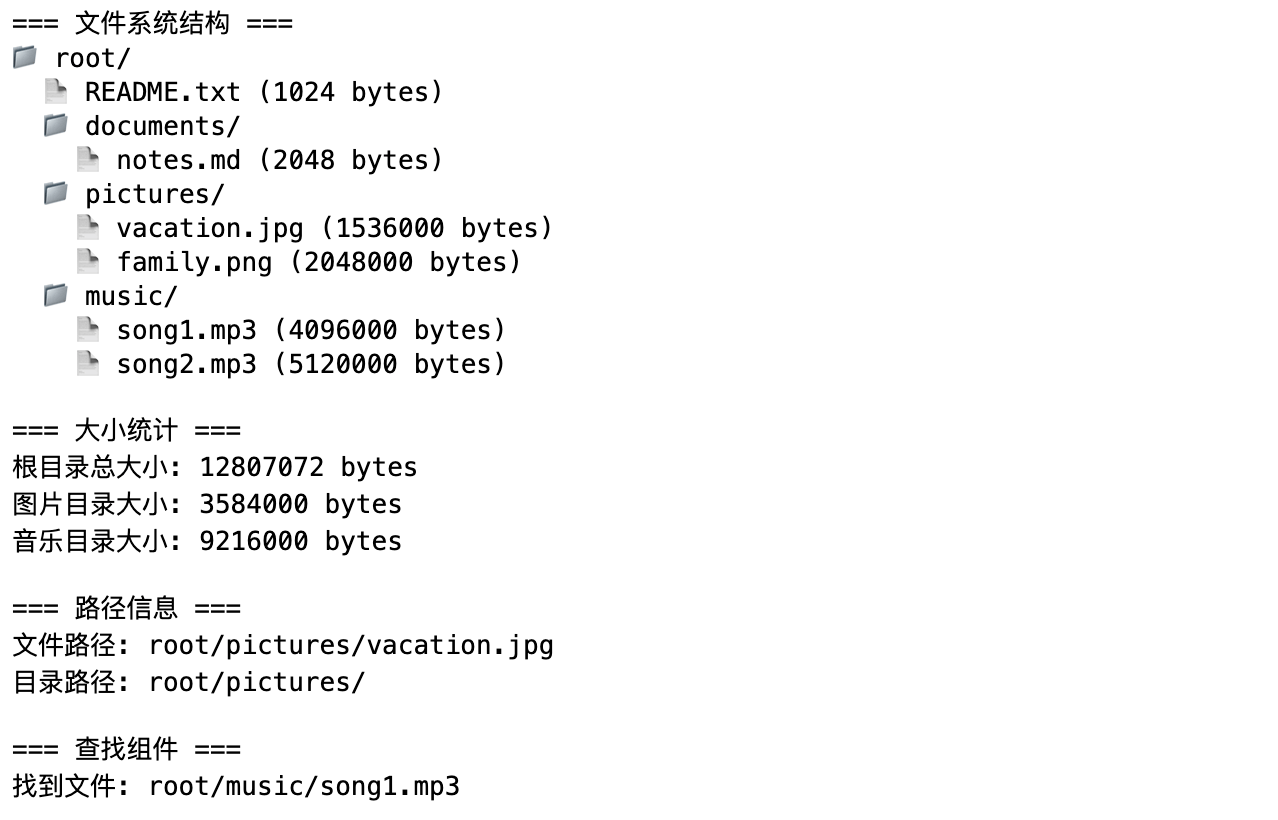
上記のコードを実行すると、次のような出力が表示されます:
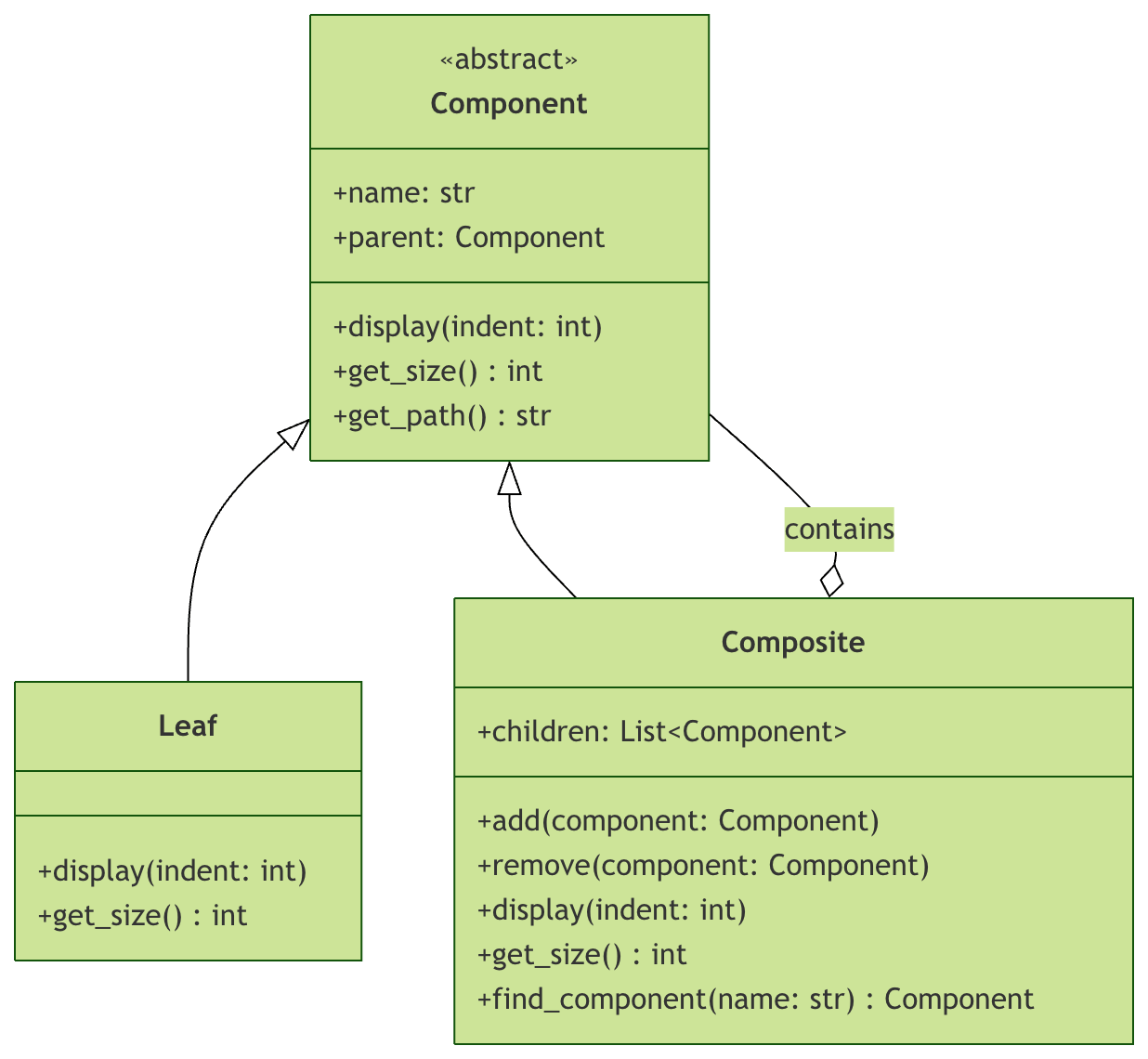
コンポジットパターンのUMLクラス図
コンポジットパターンの長所と短所
長所
- 統一されたインターフェース:クライアントは単一オブジェクトと組み合わせオブジェクトを一貫して使用できます
- 開放閉鎖の原則:既存のコードを変更せずに新しいタイプのコンポーネントを簡単に追加できます
- クライアントコードの簡素化:クライアントは処理対象が単一オブジェクトか組み合わせかを判断する必要がありません
- 柔軟な階層構造:複雑なツリー構造を構築できます
短所
- 設計の複雑さ:過度に汎用化された設計はシステムを複雑にする可能性があります
- 型安全性の問題:状況によっては、実行時の型チェックが必要になる場合があります
- パフォーマンスの考慮:大規模な階層構造では、再帰操作がパフォーマンスに影響を与える可能性があります
実際の適用シーン
1. GUIコンポーネントシステム
例
class UIComponent:
"""UIコンポーネント基底クラス"""
def render(self):
pass
def add(self, component):
pass
class Button(UIComponent):
"""ボタン - リーフノード"""
def render(self):
print("ボタンをレンダリング")
class Panel(UIComponent):
"""パネル - コンポジットノード"""
def __init__(self):
self.children = []
def add(self, component):
self.children.append(component)
def render(self):
print("パネルのレンダリングを開始")
for child in self.children:
child.render()
print(パネルのレンダリングを終了)
"""UIコンポーネント基底クラス"""
def render(self):
pass
def add(self, component):
pass
class Button(UIComponent):
"""ボタン - リーフノード"""
def render(self):
print("ボタンをレンダリング")
class Panel(UIComponent):
"""パネル - コンポジットノード"""
def __init__(self):
self.children = []
def add(self, component):
self.children.append(component)
def render(self):
print("パネルのレンダリングを開始")
for child in self.children:
child.render()
print(パネルのレンダリングを終了)
2. 組織構造の管理
例
class Employee:
"""従業員基底クラス"""
def get_salary(self):
pass
class Developer(Employee):
"""開発者 - リーフノード"""
def __init__(self, salary):
self.salary = salary
def get_salary(self):
return self.salary
class Department(Employee):
"""部門 - コンポジットノード"""
def __init__(self):
self.employees = []
def add(self, employee):
self.employees.append(employee)
def get_salary(self):
return sum(emp.get_salary() for emp in self.employees)
"""従業員基底クラス"""
def get_salary(self):
pass
class Developer(Employee):
"""開発者 - リーフノード"""
def __init__(self, salary):
self.salary = salary
def get_salary(self):
return self.salary
class Department(Employee):
"""部門 - コンポジットノード"""
def __init__(self):
self.employees = []
def add(self, employee):
self.employees.append(employee)
def get_salary(self):
return sum(emp.get_salary() for emp in self.employees)
実践演習
演習1:ファイルシステムの拡張
ファイルシステムに以下の機能を追加してください:
- ファイルコピー機能を実装する
- ファイルタイプのフィルタ検索を追加する
- ディレクトリ深度制限表示を実装する
演習2:メニューシステムの設計
レストランのメニューシステムを設計してください。要件:
- メニューには料理またはサブメニューを含めることができる
- 合計価格を計算できる
- カテゴリ別に料理をフィルタリングできる
演習3:組織図
会社の組織構造システムを作成してください:
- 従業員は個人または部門にすることができる
- 部門は他の従業員またはサブ部門を含めることができる
- 部門の総人数と総給与を計算できる
まとめ
コンポジットパターンは、統一されたインターフェースを通じて単一オブジェクトとオブジェクトの組み合わせを処理するため、クライアントコードがより簡潔で柔軟になります。このパターンは、ファイルシステム、GUIコンポーネント、組織構造などの階層構造を持つシーンに特に適しています。
重要なポイント:
- コンポーネントインターフェースはすべてのオブジェクトの共通操作を定義します
- リーフノードは基本機能を実装します
- コンポジットノードは子コンポーネントを管理し、集約操作を提供します
- クライアントは単一オブジェクトとオブジェクトの組み合わせを区別する必要がありません